
VersusE-signature & PDF
Acrobat Standard vs Pro: Which Features Actually Need the Pro License
Acrobat Standard vs Pro for small teams: what Pro adds (OCR, redaction, compare, web forms, bulk e-sign), what each license costs, and who can skip it.
Disclosure: we may earn a commission if you buy through links on this page. It costs you nothing extra and never decides a quick answer or an Our pick tag. How we make money.

Quick answer
Pick Acrobat Standard if your people edit, convert, fill, sign and password-protect PDFs; it does all of that for $14.99 a month on an annual plan13. Pick Acrobat Pro for the people who redact, turn scans into editable text, compare versions, build web forms or send e-signatures in bulk, which costs $5 a month more for individuals and $7 more per team license123.
Head-to-head
Acrobat Standard vs Acrobat Pro, side by side
| Criterion | Acrobat Standard | Acrobat Pro |
|---|---|---|
| Individual price, annual plan billed monthly1 | $14.99/moOur pick |
$19.99/mo |
| Team price per license, annual plan2 | $16.99/mo ($203.88/yr prepaid)Our pick |
$23.99/mo ($287.88/yr prepaid) |
| Edit, convert, organize, password-protect345 | Included | Included |
| Collect e-signatures and track responses345 | Included | Included, plus bulk sending, reusable templates and branded agreementsOur pick |
| Redaction35 | Not included | IncludedOur pick |
| Scans to editable, searchable PDFs (OCR)35 | Not included | IncludedOur pick |
| Compare two PDFs35 | Not included | IncludedOur pick |
| Web forms35 | Not included | IncludedOur pick |
| AI Assistant and PDF Spaces13 | Not included (Studio only) | Not included (Studio only) |
An Our pick tag marks the side the cited facts favor on that row. No tag means the facts don't clearly favor either side. Numbers after a criterion point to its sources.
Acrobat Standard
From $14.99/mo on an annual plan, billed monthly · checked
Visit Acrobat Standard (opens in a new tab)Acrobat Pro
From $19.99/mo on an annual plan, billed monthly · checked
Visit Acrobat Pro (opens in a new tab)Acrobat Standard vs Pro is a smaller decision than Adobe’s pricing page makes it look. Both licenses edit, convert, fill, sign and password-protect PDFs. Pro adds a specific set of tools: redaction, turning scans into editable text, comparing two PDFs, web forms and bulk e-signature sending35. If nobody on your team does those things, Standard is enough. If one or two people do, they need Pro and everyone else may not. Every price and feature below comes from Adobe’s and Foxit’s own pages, checked on 21 November 2026. We haven’t run either license for this piece; how we compare explains the method.
The short version
Most office staff who open, edit, merge, fill and sign PDFs can live on Standard. It costs $14.99 a month on an annual plan for one person, or $16.99 per license on a team plan12.
The people who should get Pro are the ones whose job includes one of these tasks:
- removing personal or confidential information before a document leaves the building (redaction)3;
- turning scanned paper into searchable, editable PDFs (OCR)3;
- checking what changed between two versions of a contract or policy (compare)3;
- publishing a PDF form as a web form, or sending one agreement to many signers at once35.
Pro costs $19.99 a month for an individual on an annual plan and $23.99 per team license12. That’s $60 a year more per person on individual plans and $84 a year more per team license.
Acrobat Standard vs Pro pricing
Adobe sells three paid tiers (Standard, Pro and Studio) on three billing options for individuals, and on annual plans only for teams12.
| Plan | Monthly plan | Annual, billed monthly | Annual, prepaid |
|---|---|---|---|
| Standard, individual | $24.99/mo | $14.99/mo | $179.88/yr |
| Pro, individual | $29.99/mo | $19.99/mo | $239.88/yr |
| Studio, individual | $34.99/mo | $24.99/mo | $299.88/yr |
| Standard for teams | Not offered | $16.99/mo per license | $203.88/yr |
| Pro for teams | Not offered | $23.99/mo per license | $287.88/yr per license |
| Studio for teams | Not offered | $29.99/mo per license | $359.88/yr per license |
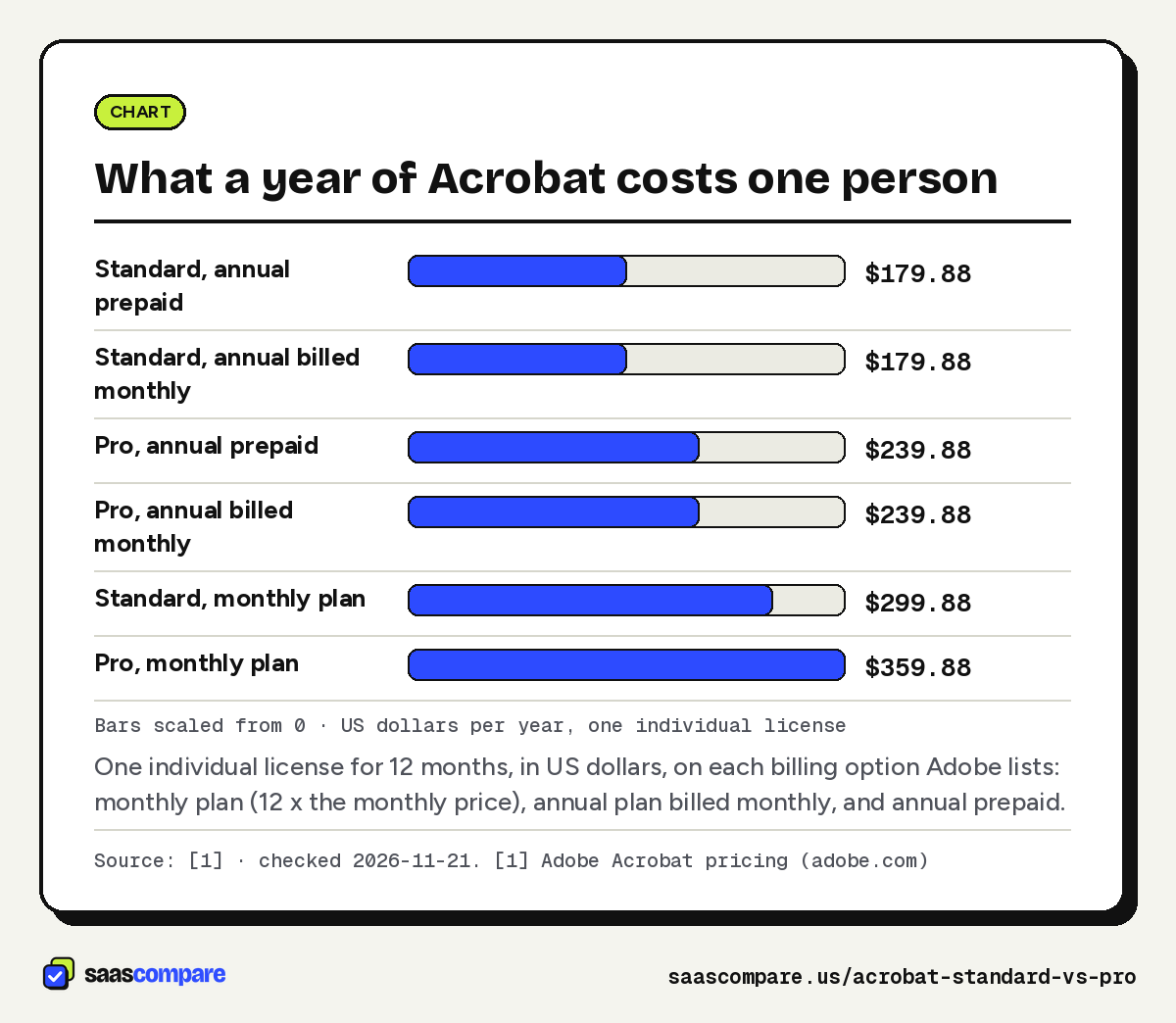
The billing option matters more than the tier. A Pro license on the monthly plan costs $359.88 over 12 months, against $239.88 on an annual plan1. That $120 gap is twice the $60 difference between Standard and Pro on the same annual plan. The trade-off is flexibility: monthly plans can be cancelled anytime with no fee, while cancelling an annual plan billed monthly after 14 days costs up to half the remaining commitment, and prepaid plans aren’t refunded after 14 days1.
So if you know you’ll use Acrobat all year, take the annual plan and decide the tier on features. If you need it for one project, a monthly Standard or Pro plan avoids the cancellation fee.
Bars scaled from 0 · US dollars per year, one individual license
One individual license for 12 months, in US dollars, on each billing option Adobe lists: monthly plan (12 x the monthly price), annual plan billed monthly, and annual prepaid.
Source: [1] · checked 2026-11-21Download image
Worked examples for a small team
All examples use team licenses on an annual plan, billed monthly2.
- 10 people, all on Standard. 10 x $16.99 = $169.90 a month, or $2,038.80 a year.
- 10 people, all on Pro. 10 x $23.99 = $239.90 a month, or $2,878.80 a year. The extra $840 a year buys Pro tools for people who may never open them.
- 10 people, 3 on Pro and 7 on Standard. 3 x $23.99 plus 7 x $16.99 = $190.90 a month, or $2,290.80 a year. That’s $588 a year less than putting everyone on Pro.
- A solo consultant. Standard prepaid is $179.88 a year and Pro prepaid $239.881. Team plans add the Adobe Admin Console and 24x7 support2; one person working alone rarely needs either.
Team plans cost a little more per seat than individual plans ($16.99 against $14.99 for Standard, $23.99 against $19.99 for Pro)12. What you get for that is administration: licenses managed in the Adobe Admin Console, 24x7 tech support, and licenses and files that stay with the company when someone leaves2. For a team of more than two or three, that last point alone usually justifies the team plan.
What Standard already covers
Adobe describes Standard as “the simple PDF tool for editing and converting documents”4. It includes:
- viewing, printing, sharing and commenting4;
- editing text and images, plus exporting, protecting and organizing documents4;
- converting documents to and from PDF3;
- filling out and signing forms3;
- collecting binding e-signatures and tracking responses4;
- password protection3.
Standard is available on desktop, web and mobile4. For a typical office worker who turns Word files into PDFs, merges a few documents, fixes a typo in a supplier quote and signs an agreement, that list is the job.
If people only need to read and comment, they don’t need a paid license at all. Acrobat Reader, which covers viewing, printing, sharing and commenting, is free3.
What Pro adds over Standard
Adobe says Pro “includes everything in Acrobat Standard, plus enhanced PDF tools and e-signature capabilities” and lists “70+ advanced PDF tools”13. The ones that matter in practice:
Redaction. Pro can redact PDFs; Standard can’t35. Redaction removes content rather than covering it, which is what you want before sending a contract, an HR file or a court document with names, account numbers or salaries in it. If anyone on your team does this today by drawing black boxes, that person needs Pro.
Scans to editable PDFs. Pro turns scanned documents into editable, searchable PDFs35. This is OCR, and it’s the feature that most often forces an upgrade: the receptionist who scans signed paperwork, the bookkeeper who gets paper invoices, the ops lead who wants to search old contracts.
Compare PDFs. Pro compares two PDFs35, which is how you spot what a counterparty changed between drafts of an agreement.
Web forms. Pro creates web forms15. Standard fills and signs forms but doesn’t publish them as web forms3.
E-signature at volume. Both licenses collect e-signatures and track responses45. Pro adds bulk sending, reusable e-sign templates and branding agreements with your logo and a custom URL35. If you send the same NDA or policy acknowledgment to many people, those are the features you’d use.
The rest of the 70+ tools aren’t itemised on the pages we checked, so we haven’t listed them.
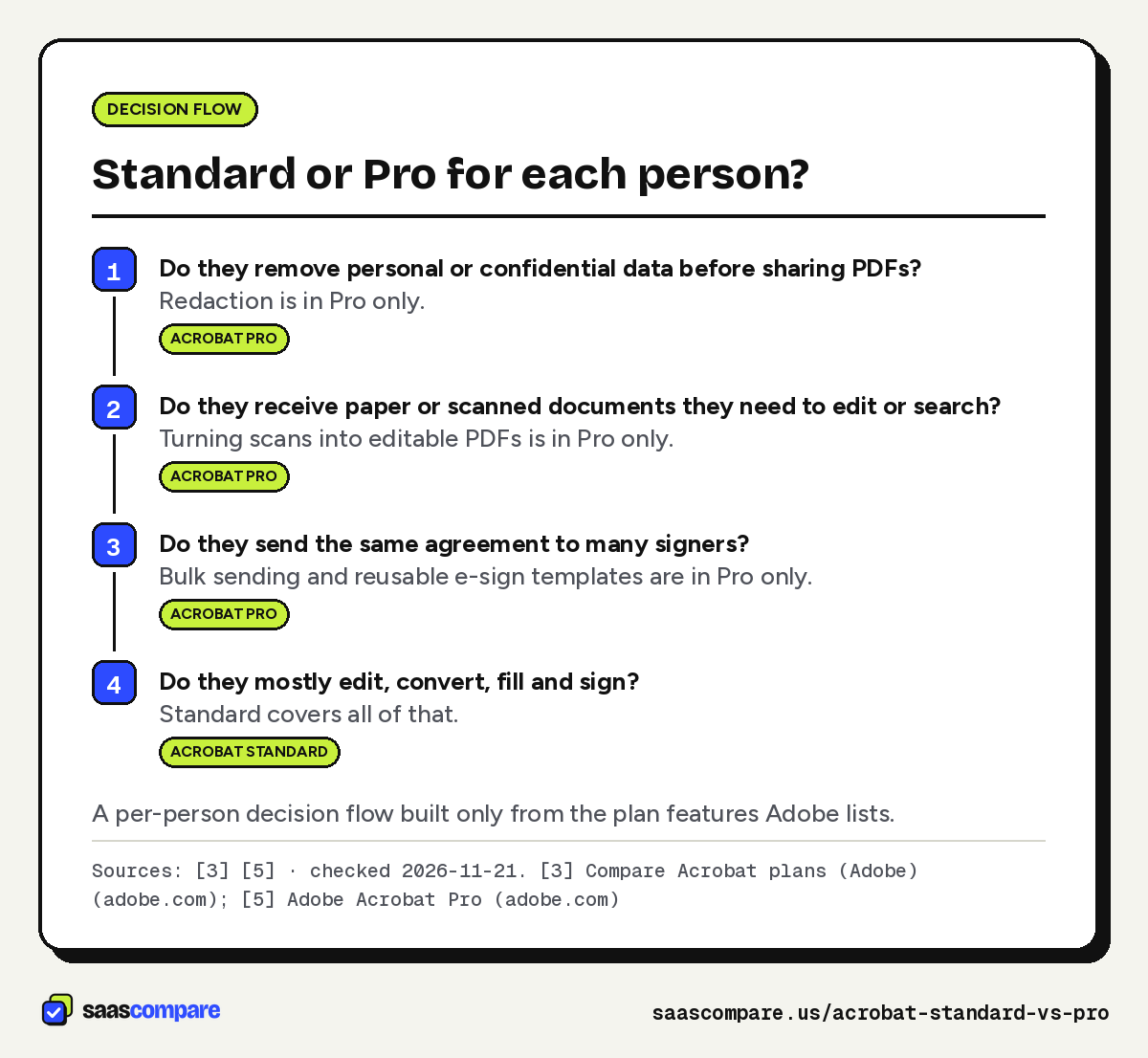
Before you buy Pro for everyone, ask each person one question: in the last month, did you redact a document, scan paper you then had to edit, compare two drafts, or send the same agreement to a group? Anyone who says no to all four is a Standard user.
A quick way to audit this on a small team is to look at what people do outside Acrobat today. If someone prints a PDF, blacks out lines with a marker and scans it back in, that’s a redaction job. If someone retypes text from a scanned invoice, that’s an OCR job. If someone emails ten copies of the same policy and chases each signature by hand, that’s a bulk-sending job. Those are the people who earn back the extra $7 a month on a team license2.
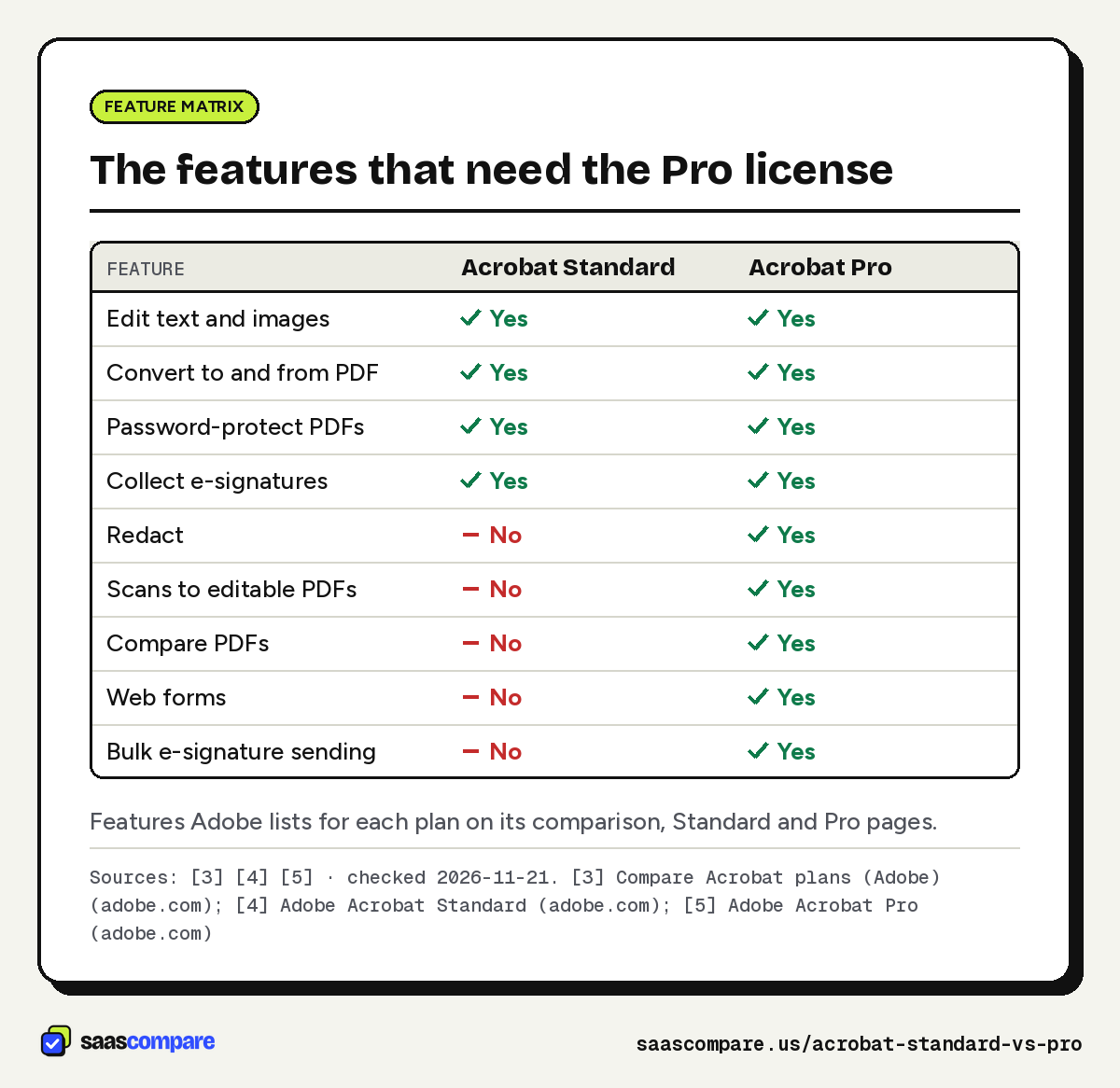
| Feature | Acrobat Standard | Acrobat Pro |
|---|---|---|
| Edit text and images | Yes | Yes |
| Convert to and from PDF | Yes | Yes |
| Password-protect PDFs | Yes | Yes |
| Collect e-signatures | Yes | Yes |
| Redact | No | Yes |
| Scans to editable PDFs | No | Yes |
| Compare PDFs | No | Yes |
| Web forms | No | Yes |
| Bulk e-signature sending | No | Yes |
Features Adobe lists for each plan on its comparison, Standard and Pro pages.
Sources: [3] [4] [5] · checked 2026-11-21Download image
Do you need Studio instead?
Acrobat Studio includes everything in Pro, plus AI Assistant, PDF Spaces and Adobe Express Premium3. Adobe lists AI features to edit, convert and compress PDFs, summaries and answers from documents, and tools to generate flyers, social content and presentations from documents1.
Studio costs $24.99 a month for an individual on an annual plan billed monthly, $5 more than Pro, and $29.99 per team license, $6 more than Pro for teams12. Neither Standard nor Pro includes AI Assistant or PDF Spaces13. Pick Studio only for the people who will actually ask AI questions of long documents; for redaction, OCR and bulk signing, Pro already has what you need.
A lower-cost option for Pro-style features
If the only reason you’re looking at Pro is OCR or comparing documents, it’s worth pricing Foxit PDF Editor before you upgrade. Foxit lists PDF Editor at $129.99 per user per year, with Windows and macOS desktop apps plus a web app, OCR that turns scans into searchable PDFs, and comparison of two PDF versions6. PDF Editor+ is $159.99 per user per year and adds AI Smart Redact, Foxit eSign with 150 envelopes a year, and iOS and Android apps6. Foxit also sells PDF Editor 14 as a one-time purchase at $209.99 per user, and offers volume licensing for 30 or more licenses6.
Against Acrobat Pro’s $239.88 a year prepaid for one person1, Foxit PDF Editor+ is $80 a year less per user, and the base PDF Editor $109.89 less6. The trade-off is moving away from the format’s own vendor, and e-signature on Editor+ is capped at 150 envelopes a year6. If you want to compare it with your own files, you can try Foxit PDF Editor.
For teams whose main need is sending documents for signature rather than editing PDFs, our PandaDoc alternatives guide covers e-signature tools priced per seat.
Which should you pick?
Decide per person, not per company. Adobe sells each tier by the license2, so the cheapest setup is usually Standard for most people and Pro for the few who need it.
Pick Acrobat Standard for someone who:
- edits text and images, converts and organizes PDFs4;
- fills, signs and sends documents for signature one at a time34;
- password-protects files before sharing them3.
Pick Acrobat Pro for someone who:
- redacts personal or confidential information3;
- works with scanned paper that needs to be searchable or editable3;
- compares contract drafts or publishes web forms35;
- sends the same agreement to many signers, or wants reusable e-sign templates3.
Give people who only read and comment the free Acrobat Reader3. And if you only need Acrobat for a few weeks, take a monthly plan: it costs more per month but carries no cancellation fee1. For how we choose what to cover and how we handle affiliate links, see our editorial policy.
- Do they remove personal or confidential data before sharing PDFs?Redaction is in Pro only.Acrobat Pro
- Do they receive paper or scanned documents they need to edit or search?Turning scans into editable PDFs is in Pro only.Acrobat Pro
- Do they send the same agreement to many signers?Bulk sending and reusable e-sign templates are in Pro only.Acrobat Pro
- Do they mostly edit, convert, fill and sign?Standard covers all of that.Acrobat Standard
A per-person decision flow built only from the plan features Adobe lists.
Sources: [3] [5] · checked 2026-11-21Download image
Plans
Plans and prices
Acrobat Standard
Individual, annual billed monthly
$14.99/mo
Fee of up to half the remaining commitment if cancelled after 14 days · checked 2026-11-21
- Edit text and images
- Convert to and from PDF
- Fill and sign
- Collect e-signatures and track responses
- Password protection
Individual, annual prepaid
$179.88/yr
No refund after 14 days · checked 2026-11-21
- Same features as above
Individual, monthly
$24.99/mo
Cancel anytime, no fee · checked 2026-11-21
- Same features as above
Standard for teams
$16.99/mo per license
Annual plan, billed monthly ($203.88 prepaid) · checked 2026-11-21
- Adobe Admin Console
- 24x7 tech support
- Licenses and assets stay with the company
Acrobat Pro
Individual, annual billed monthly
$19.99/mo
Fee of up to half the remaining commitment if cancelled after 14 days · checked 2026-11-21
- Everything in Standard
- Redaction
- Scans to editable PDFs
- Compare PDFs
- Web forms
- Bulk e-signatures
Individual, annual prepaid
$239.88/yr
No refund after 14 days · checked 2026-11-21
- Same features as above
Individual, monthly
$29.99/mo
Cancel anytime, no fee · checked 2026-11-21
- Same features as above
Pro for teams
$23.99/mo per license
Annual plan, billed monthly ($287.88 prepaid per license) · checked 2026-11-21
- Adobe Admin Console
- 24x7 tech support
- Licenses and assets stay with the company
Strengths and limits
Strengths and limits
Acrobat Standard
Visit Acrobat Standard (opens in a new tab)Strengths
- Covers editing, converting, organizing, filling, signing and password protection [S3, S4]
- Collects binding e-signatures and tracks responses [S4]
- $5 a month less than Pro for individuals and $7 less per team license [S1, S2]
Limits
- No redaction, no OCR of scans, no PDF compare and no web forms [S3, S5]
- No bulk e-signature sending, branded agreements or reusable e-sign templates [S3]
Acrobat Pro
Visit Acrobat Pro (opens in a new tab)Strengths
- Everything in Standard plus "70+ advanced PDF tools" [S1, S3]
- Redaction, OCR, PDF compare and web forms in one license [S5]
- Bulk e-signature sending, reusable templates and branded agreements [S3, S5]
Limits
- Team license costs $23.99 a month against $16.99 for Standard, so $84 more per seat a year [S2]
- No AI Assistant or PDF Spaces; those need Acrobat Studio [S1, S3]
FAQ
Questions people ask
What is the difference between Acrobat Standard and Pro?
Pro includes everything in Standard plus redaction, turning scans into editable PDFs, comparing PDFs, web forms, reusable e-sign templates, branded agreements and bulk e-signature sending35. Standard covers editing, converting, organizing, filling, signing, collecting e-signatures and password protection34.
How much does Acrobat Pro cost?
Does Adobe Acrobat cost money?
Can Acrobat Standard redact PDFs?
Is Acrobat Studio worth it over Pro?
What happens if I cancel an annual Acrobat plan early?
On an annual plan billed monthly, a fee of up to half your remaining annual commitment applies if you cancel after 14 days. Prepaid annual plans aren’t refunded after 14 days. Monthly plans can be cancelled anytime with no fee1.
Sources
Sources
Small numbers in the text, like 1, point here. Each source shows the date we last checked it.
- 1Adobe Acrobat pricingadobe.com
- 2Adobe Acrobat for teams pricingadobe.com
- 3Compare Acrobat plans (Adobe)adobe.com
- 4Adobe Acrobat Standardadobe.com
- 5Adobe Acrobat Proadobe.com
- 6Foxit PDF Editor pricingfoxit.com
Updated . See something out of date? Tell us and we will check it against the vendor's page.