
VersusProject & work management
Airtable vs monday.com: Database-First or Board-First for Your Team?
Airtable vs monday.com for teams of 5 to 200: seat prices, free plans, record limits, automations and Gantt views compared, plus where Asana and SmartSuite fit.
Disclosure: we may earn a commission if you buy through links on this page. It costs you nothing extra and never decides a quick answer or an Our pick tag. How we make money.

Quick answer
Pick monday.com if you’re running projects and want Gantt, timeline and guest access from $12 a seat billed annually3. Pick Airtable if your work is really a relational database and only a few people edit, because Airtable bills editors only and read-only users are free1.
Head-to-head
Airtable vs monday.com, side by side
| Criterion | Airtable | monday.com |
|---|---|---|
| Free plan23 | Up to 5 editors, 1,000 records per base, 100 automation runs2Our pick | Up to 2 seats and 3 boards3 |
| Lowest paid seat13 | $20/user/mo on Team, billed annually ($24 monthly) |
$9/seat/mo on Basic, billed annually, from 3 seatsOur pick |
| Who you pay for123 | Editors only; read-only users are free. Commenters are billable on Team2 | Seats, from 3; viewers are free from Basic3 |
| Gantt and timeline views1345 | All paid plans, so from $20/user/mo45 |
From Standard, $12/seat/mo billed annually3Our pick |
| Record or item limit23 | 50,000 records per base on Team, 125,000 on Business2 | Unlimited items from Basic3Our pick |
| Automations at about $20 a seat23 | 25,000 runs a month per workspace on Team2 | 25,000 automation actions a month on Pro3 |
| Guest access13 | Free read-only collaborators and share links on every plan1 | Guests from Standard3 |
| Revision history23 | 2 weeks on Free, 1 year on Team and Business2 | Not listed on the pricing page3 |
An Our pick tag marks the side the cited facts favor on that row. No tag means the facts don't clearly favor either side. Numbers after a criterion point to its sources.
monday.com
From $9/seat/mo billed annually (3-seat minimum) · checked
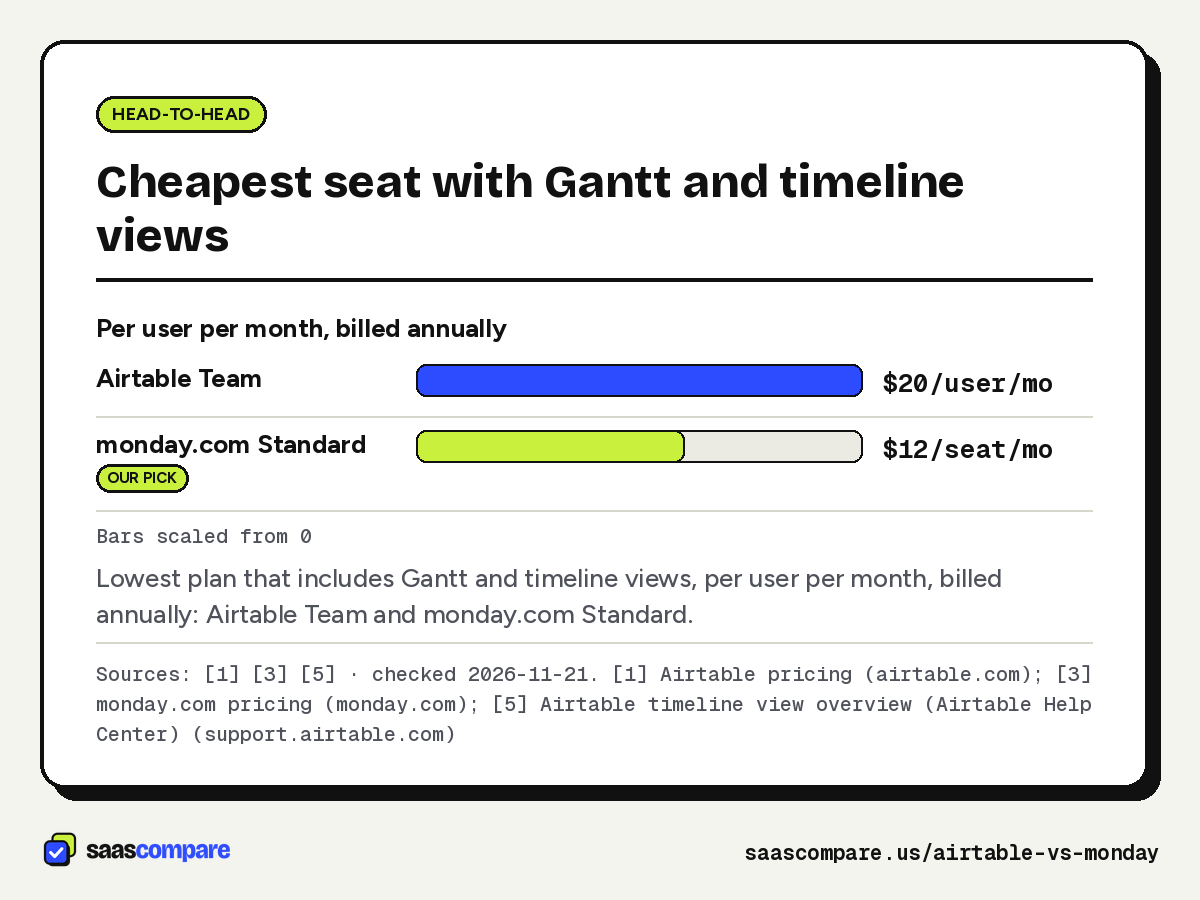
Visit monday.com (opens in a new tab)Lowest plan that includes Gantt and timeline views, per user per month, billed annually: Airtable Team and monday.com Standard.
Sources: [1] [3] [5] · checked 2026-11-21Download image
Airtable vs monday comes down to one question: is your work a database or a project plan? Airtable starts from tables, records and linked fields, then layers on views and interfaces. monday.com starts from boards of items with owners, statuses and dates, then layers on timelines and automations. Both can be bent into the other’s shape, but the pricing models punish you for bending too far. Every price and limit below comes from the vendors’ own pages, checked on 21 November 2026. We haven’t run either tool for this piece; how we compare explains the method.
The short version
Pick monday.com if you’re a team of 5 to 50 running projects, campaigns or client work and want Gantt charts and guest access without paying $20 a seat3. Pick Airtable if you’re tracking inventory, content, applicants or any list of records with relationships, and only a handful of people edit while the rest look things up for free1. If you want both in one place, look at SmartSuite, which we cover near the end.
Airtable vs monday pricing
Both tools sell per seat, but they count seats differently.
| Plan | Airtable | monday.com |
|---|---|---|
| Free | Up to 5 editors2 | Up to 2 seats3 |
| Entry paid | Team, $20/user/mo annual, $24 monthly2 | Basic, $9/seat/mo annual3 |
| Middle | Business, $45/user/mo annual, $54 monthly2 | Standard $12, Pro $19 per seat/mo annual3 |
| Top | Enterprise Scale, custom1 | Enterprise, custom3 |
| Who’s billed | Editors; read-only is free1 | Seats from 3; viewers free3 |
monday.com’s page shows only annual prices and says the monthly plan isn’t discounted, while yearly plans get an 18% discount3. Plans start from 3 users, and teams over 40 are asked to request a quote3.
Airtable bills only users with edit access to at least one base. Read-only collaborators, form submissions and share links are free, and seats added mid-month are prorated1. On Team, commenters count as billable; on Business they don’t2.
Worked examples, all billed annually:
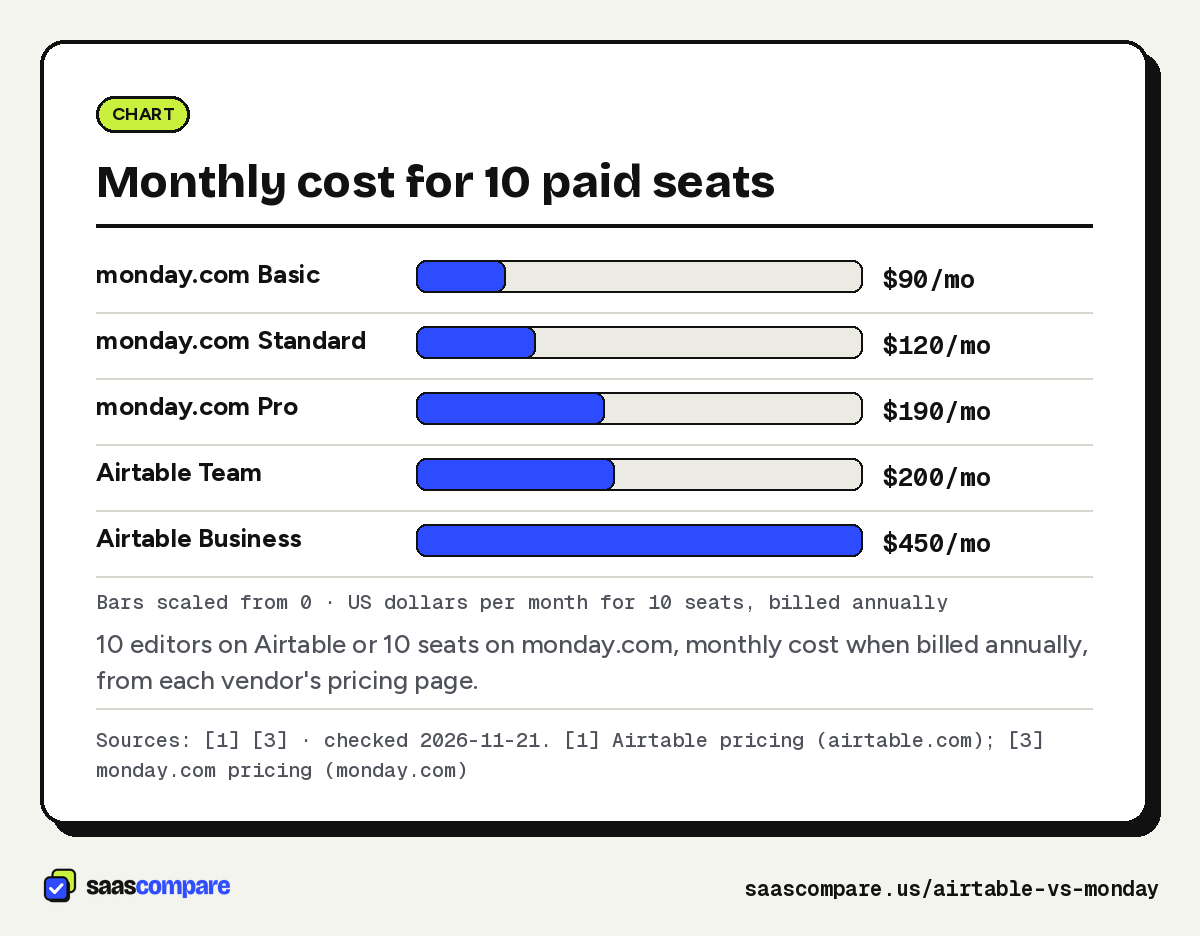
- 10 people, all editing. monday.com Standard is $120 a month and Pro $1903. Airtable Team is $200 and Business $4501.
- 10 people, 3 edit and 7 only read. Airtable Team bills 3 editors, so $60 a month1. On monday.com, the 7 could be free viewers, with a 3-seat Standard plan at $36 a month3.
- A team of 2. Both free plans cover you: Airtable for up to 5 editors, monday.com for 2 seats and 3 boards23. On paid plans, monday.com’s 3-seat minimum means you pay for a seat you don’t use3.
Bars scaled from 0 · US dollars per month for 10 seats, billed annually
10 editors on Airtable or 10 seats on monday.com, monthly cost when billed annually, from each vendor’s pricing page.
Sources: [1] [3] · checked 2026-11-21Download image
Data model and limits
This is where the database-first versus board-first split shows up in the numbers. Airtable caps records per base: 1,000 on Free, 50,000 on Team and 125,000 on Business, with attachment storage of 1GB, 20GB and 100GB per base2. If you exceed a record or attachment limit, you keep access to your data but can’t add more until you upgrade1.
monday.com lists unlimited items from the Basic plan3. Its pricing page doesn’t list storage limits3. For a project team, items are tasks, and few boards ever approach tens of thousands. For a team storing a product catalogue or years of order history, Airtable’s per-base cap is the number to watch, and you may end up splitting data across bases.
Airtable also keeps revision and snapshot history for 2 weeks on Free and 1 year on Team and Business2. monday.com’s pricing page doesn’t list a history period3.
Views and project planning
monday.com puts its timeline, Gantt and calendar views on Standard and up, at $12 a seat billed annually3. Pro adds time tracking and private boards and docs3. Free and Basic don’t include those views3.
Airtable’s timeline view and its Gantt view are on all paid plans45. The Gantt view supports dependencies through a linked-record field, shown as arrows, and treats records with only an end date as milestones4. You can drag bars to change dates unless the dates come from computed fields, and the view exports to CSV but can’t be printed directly4. On the Free plan, calendar views with date ranges, record coloring and extensions aren’t supported2.
Both tools can do a Gantt chart. monday.com gets you there for less per seat; Airtable gets you there on data you may already keep in it.
Automations and integrations
At the entry tiers the gap is wide. monday.com Basic lists no automations, and Standard includes 250 automation actions and 250 integration actions a month3. Airtable Free includes 100 automation runs a month and Team 25,000 per workspace2.
At about $20 a seat they even out. monday.com Pro, at $19 billed annually, includes 25,000 automation actions and 25,000 integration actions a month, 10,000 API calls a day and 20 workflows3. Airtable Team, at $20, includes 25,000 automation runs and 100,000 API calls a month per workspace2. Airtable Business raises runs to 100,000 a month and makes API calls unlimited2.
If your team plans to automate status changes, reminders and hand-offs, budget for monday.com Pro rather than Standard; 250 actions a month runs out quickly for a 10-person team.
Sharing with people outside the team
Airtable’s model is generous to readers: read-only collaborators, share links and form submissions cost nothing on any plan1. That suits a team that publishes a database to the rest of the company or to clients.
monday.com offers unlimited free viewers with read-only access from Basic, and guest access from Standard3. Guests are external users who can only access the boards you invite them to3. Private boards need Pro3.
AI, admin and growing past 40 people
Both tools now meter AI with credits, but they count them differently. Airtable gives 500 credits a month per editor on Free, 15,000 per billable collaborator on Team and 20,000 per paid user on Business2. monday.com lists 1,000 AI credits a month on Basic, 2,000 on Standard and 3,000 on Pro3. Because one is quoted per user and the other per plan, don’t compare the raw numbers; check what a typical action costs in each before you lean on AI features.
On administration, Airtable Business adds an admin panel and two-way sync, and Business and Enterprise Scale need a private email domain2. Enterprise Scale adds unlimited org units, workspaces and bases1. monday.com Enterprise lists portfolio and resource management, multi-level permissions, 24/7 enterprise support and a 99.9% uptime SLA, with 250,000 automation and integration actions a month3.
Two billing details are worth knowing. Airtable offers non-profits and education 50% off the monthly Team price2, and Business bought through sales can be invoiced by PO, ACH, wire or check1. monday.com asks teams of more than 40 to request a quote3, so a growing team should expect a sales conversation at that point on monday.com, and at Enterprise Scale on Airtable.
Migration and switching costs
Neither pricing page we checked mentions an importer for the other tool13, so treat a move between them as a rebuild rather than a copy. The cost isn’t the seats; it’s re-creating automations, views and the habits built around them. Before you switch, count the automations you run today and check them against the target plan: 250 actions a month on monday.com Standard won’t cover a workflow that ran 5,000 times a month on Airtable Team23. Count records too, since a 70,000-row Airtable table already needs Business2, and the same data on monday.com fits any paid plan’s unlimited items3.
Where Asana and SmartSuite fit
Asana sits on monday.com’s side of the line: a project tool, not a database. Starter costs $10.99 per user a month billed annually or $13.49 monthly, with timeline and Gantt views and unlimited automations; Advanced is $24.99 annually6. The free Personal plan allows 2 users6. If your Airtable base is really a task list, Asana is a fair third option. If it’s a database, it isn’t.
SmartSuite tries to be both: relational tables plus work management. Team costs $15 per member a month billed annually with a 3-member minimum, and Professional $32 with a 5-member minimum7. Read-only users, commenters and form submitters aren’t billed7. The limit to know is 5,000 records per Solution on Team, against Airtable Team’s 50,000 per base27. If that fits, you can try SmartSuite. Our Airtable alternatives guide covers SmartSuite, Baserow, NocoDB and others in more depth, and our monday.com alternatives and Smartsheet alternatives pages cover the project side.
Which should you pick?
Pick monday.com if:
- you plan work with owners, dates and dependencies, and want Gantt and timeline from $12 a seat billed annually3;
- tables could grow past 50,000 rows, since items are unlimited3;
- most people who touch the board also update it.
Pick Airtable if:
- your work is records with relationships (products, content, candidates, assets) rather than tasks;
- a few editors maintain the data and many people only view it, because read-only users are free1;
- you’re a team of 2 to 5 that can live on the free plan’s 5 editors and 1,000 records per base2.
If neither fits cleanly, a hybrid like SmartSuite or a project tool like Asana may be the better call. Both have free plans, so you can test monday.com and Airtable with your own data before you commit seats23. For how we choose what to cover and how we handle affiliate links, see our editorial policy.
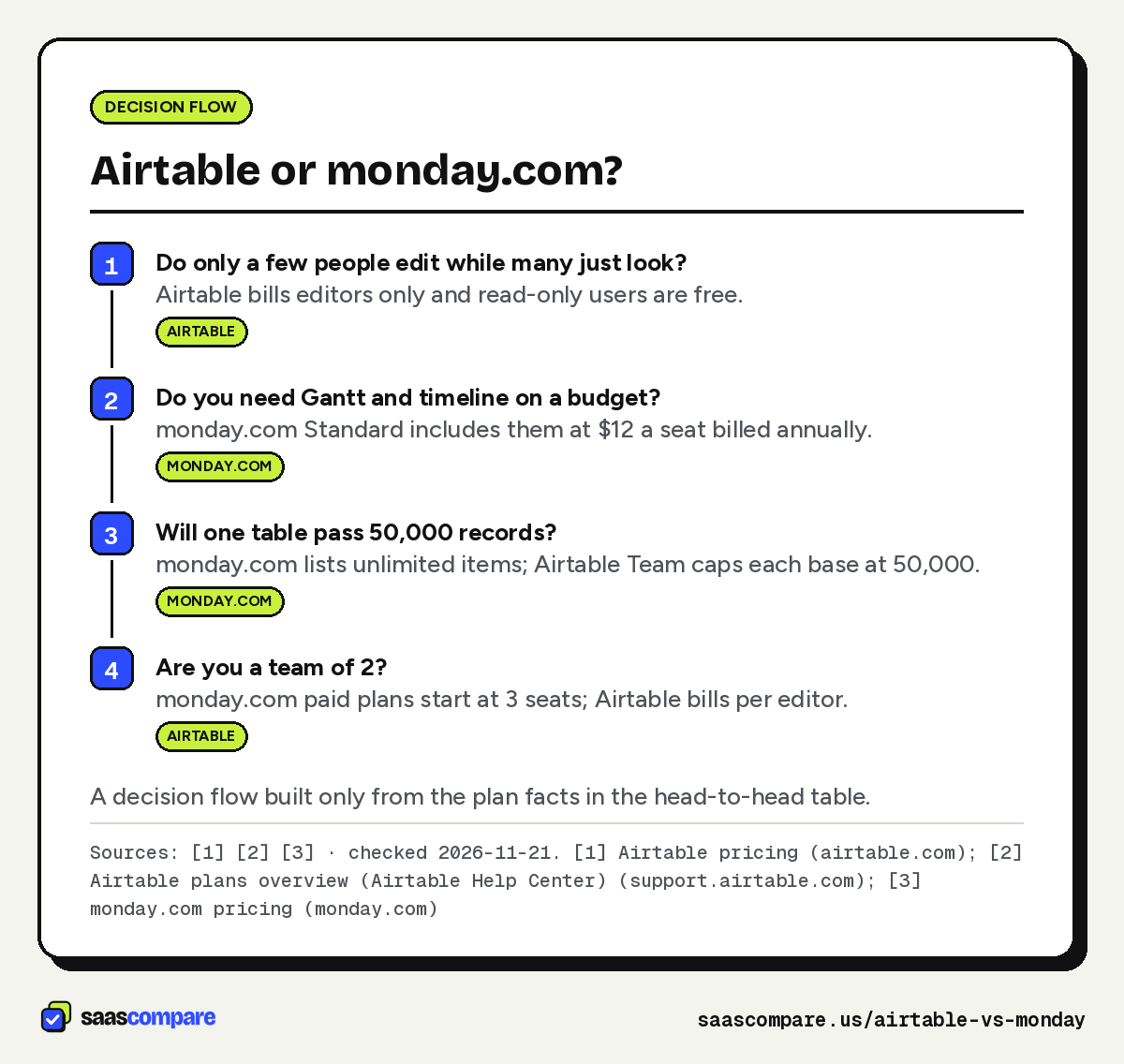
- Do only a few people edit while many just look?Airtable bills editors only and read-only users are free.Airtable
- Do you need Gantt and timeline on a budget?monday.com Standard includes them at $12 a seat billed annually.monday.com
- Will one table pass 50,000 records?monday.com lists unlimited items; Airtable Team caps each base at 50,000.monday.com
- Are you a team of 2?monday.com paid plans start at 3 seats; Airtable bills per editor.Airtable
A decision flow built only from the plan facts in the head-to-head table.
Sources: [1] [2] [3] · checked 2026-11-21Download image
Plans
Plans and prices
Airtable
Free
$0
Up to 5 editors · checked 2026-11-21
- 1
- 000 records per base
- 1GB attachments per base
- 100 automation runs a month
Team
$20/user/mo
Billed annually ($24 monthly), per editor · checked 2026-11-21
- 50
- 000 records per base
- 20GB attachments per base
- 25,000 automation runs a month
- Interface Designer
- Timeline and Gantt views
Business
$45/user/mo
Billed annually ($54 monthly), per editor · checked 2026-11-21
- 125
- 000 records per base
- 100GB attachments per base
- 100,000 automation runs a month
- Two-way sync
- Admin panel
monday.com
Basic
$9/seat/mo
Billed annually, from 3 seats · checked 2026-11-21
- Unlimited items
- Unlimited free viewers
- 1
- 000 AI credits a month
Standard
$12/seat/mo
Billed annually, from 3 seats · checked 2026-11-21
- Timeline and Gantt views
- Calendar view
- Guest access
- 250 automation actions a month
- 250 integration actions a month
Pro
$19/seat/mo
Billed annually, from 3 seats · checked 2026-11-21
- 25,000 automation actions a month
- Time tracking
- Private boards and docs
- 20 workflows
Strengths and limits
Strengths and limits
Airtable
Visit Airtable (opens in a new tab)
Strengths
- Read-only collaborators, form submissions and share links are free
- Free plan allows up to 5 editors
- Gantt view with dependencies and milestones on every paid plan
Limits
- Entry paid seat costs $20 billed annually, more than any monday.com tier below Enterprise
- Records are capped per base (50,000 on Team)
monday.com
Visit monday.com (opens in a new tab)
Strengths
- Gantt, timeline and calendar views from $12 a seat billed annually
- Unlimited items on every paid plan, so no per-board record cap to plan around
- Unlimited free viewers from Basic
Limits
- Plans start at 3 seats, and the free plan allows only 2
- Standard includes just 250 automation actions a month
FAQ
Questions people ask
Is monday.com cheaper than Airtable?
Does Airtable have a Gantt chart?
Can I use monday.com with 1 or 2 people?
The free plan allows up to 2 seats and 3 boards. Paid plans start from 3 users3.
Does monday.com limit the number of items?
How does Asana compare with Airtable?
Is there a tool between Airtable and monday.com?
SmartSuite mixes Airtable-style tables with work management. Team costs $15 per member a month billed annually with a 3-member minimum and 5,000 records per Solution7.
Sources
Sources
Small numbers in the text, like 1, point here. Each source shows the date we last checked it.
- 1Airtable pricingairtable.com
- 2Airtable plans overview (Airtable Help Center)support.airtable.com
- 3monday.com pricingmonday.com
- 4Adding and configuring Gantt views in Airtable (Airtable Help Center)support.airtable.com
- 5Airtable timeline view overview (Airtable Help Center)support.airtable.com
- 6Asana pricingasana.com
- 7SmartSuite pricingsmartsuite.com
Updated . See something out of date? Tell us and we will check it against the vendor's page.