
AlternativesProject & work management
Monday Alternatives: Where Teams Go When monday.com's Seat Buckets Stop Fitting
Seven monday alternatives for teams of 5 to 200, compared on seat rules, Gantt views, automation limits and yearly cost, with prices from each vendor's page.
Disclosure: we may earn a commission if you buy through links on this page. It costs you nothing extra and never decides a quick answer or an Our pick tag. How we make money.

Quick answer
Pick SmartSuite if you want boards plus a database, billed per seat with a 3-user minimum and 25,000 automation runs a month on Team3. Pick Jira if you’re a software team of 10 or fewer: its Free plan covers up to 10 users and includes a timeline view6.
At a glance
The alternatives at a glance
| # | Tool | Best for | Starting price | Link |
|---|---|---|---|---|
| 01 | SmartSuite | Ops teams that want boards, a database and automations without seat buckets | $15/seat/mo billed annuallychecked 2026-11-21 | Visit (opens in a new tab) |
| 02 | Asana | Cross-team projects with clients or contractors in the loop | $10.99/user/mo billed annuallychecked 2026-11-21 | Visit (opens in a new tab) |
| 03 | Wrike | Project teams of up to 15 that want Gantt charts and dashboards | $10/user/mo billed annuallychecked 2026-11-21 | Visit (opens in a new tab) |
| 04 | Jira | Software and product teams that work in sprints and backlogs | Free up to 10 users; Standard $9.70/user/mo at 10 users, billed monthlychecked 2026-11-21 | Visit (opens in a new tab) |
| 05 | Trello | Small teams that only need simple boards | $5/user/mo billed annuallychecked 2026-11-21 | Visit (opens in a new tab) |
| 06 | Airtable | Teams whose boards are really databases of records | $20/seat/mo billed annuallychecked 2026-11-21 | Visit (opens in a new tab) |
| 07 | Plansom | Leads who want AI to pull priorities out of email, Slack and meetings | $28/user/mo billed monthlychecked 2026-11-21 | Visit (opens in a new tab) |
Prices are the lowest paid starting price on each vendor's public pricing page on the date shown, in US dollars, before tax. Confirm on the vendor's site before you buy.
If you’re looking for a monday alternative, the trigger is usually seat math rather than features. monday.com prices groups of seats, not single seats: plans start at 3 seats and then rise in multiples of 5, so a team of 4 buys 5 seats and a team of 6 buys 102. Add an automation cap of 250 actions a month on Standard1, and growing teams start to feel they’re paying for capacity they can’t use.
This guide is for teams of 5 to 200 that run projects, requests or sprints in monday.com today. We compared seven alternatives on what each vendor publishes: how seats are sold, whether the entry plan has a timeline or Gantt view, automation limits, and the yearly bill for a real team size. Prices come from each vendor’s own page, checked on November 21, 2026. We didn’t run hands-on tests for this piece. Our comparison method and editorial policy explain how we work.
Tip: Before you switch, count active editors, not everyone with a login. monday.com gives Basic and higher plans unlimited free read-only viewers1, and guest seats are counted differently from member seats2.
Monday alternatives at a glance
| Tool | Entry plan with a timeline or Gantt | How seats are sold | Free plan |
|---|---|---|---|
| SmartSuite | Team, $15/seat/mo billed annually3 | Per seat, minimum 3 users, no groups listed3 | No, 14-day trial3 |
| Asana | Starter, $10.99/user/mo billed annually4 | Singly up to 5 users, then in fives up to 304 | Personal, 2 users4 |
| Wrike | Team, $10/user/mo billed annually5 | Groups of five up to 30 seats5 | Yes5 |
| Jira | Free, up to 10 users6 | Per user; price varies by team size6 | Yes, 10 users6 |
| Trello | Premium, $10/user/mo billed annually8 | Per user8 | Yes, 10 collaborators8 |
| Airtable | Team, $20/seat/mo billed annually7 | Editors only7 | Yes, 1,000 records per base7 |
| Plansom | No board or Gantt view9 | Per user9 | Yes, 5 goals and 100 tasks9 |
For reference, monday.com Standard, the plan that adds Timeline and Gantt views and guest access, is $12 per seat per month billed annually1.
SmartSuite

Pick SmartSuite if you like how monday.com boards work but want per-seat billing and more automation headroom.
SmartSuite’s Team plan costs $15 per seat per month billed annually, or $20 billed monthly, with a minimum of 3 billable users3. Its pricing page lists that minimum but no seat groups, so a team of 6 pays for 6. Team includes 5,000 records per solution, 50 GB of file storage and 25,000 automation runs and API calls a month3. Gantt chart, timeline, kanban and calendar views are listed on every plan3.
That automation number is the clearest difference. monday.com Standard includes 250 automation actions a month, and you need Pro at $19 per seat to reach 25,0001. SmartSuite reaches 25,000 on its $15 Team plan3.
Professional, at $32 billed annually or $36 monthly with a 5-user minimum, raises the cap to 100,000 records per solution and 100,000 runs, and adds folders, Gmail and Outlook integrations and advanced permissions3. There’s no free plan. A 14-day trial gives Professional-level access for up to 50 people, with nothing charged automatically when it ends3. Watch the 5,000-record cap on Team if your boards hold years of history. For more on database-style tools, see our Airtable alternatives guide.
Asana
Pick Asana if your projects cross departments and you regularly bring clients or contractors in.
Asana Starter is $10.99 per user per month billed annually, or $13.49 billed monthly4. It includes Timeline and Gantt views, reporting dashboards, forms, custom fields, unlimited automations and unlimited free guests, with no cap on the number of users4. Advanced, at $24.99 billed annually ($30.49 monthly), adds unlimited portfolios, Goals, resource management and approvals4.
Two plan facts set it apart from monday.com Standard. Automations are unlimited on Starter, against 250 actions a month41. And guests are free and unlimited on Starter4. Don’t pick Asana to escape seat groups, though. Up to 5 users you add seats one at a time; from 5 to 30 users you add them in increments of 5, then 10 and 25 as you grow4. A team of 6 buys 10 seats, the same as on monday.com42. The free Personal plan is for one or two people, so a team needs Starter from the start4.
Wrike

Pick Wrike if you run client or internal projects with 15 people or fewer and want interactive Gantt charts and dashboards.
Wrike Team is $10 per user per month, billed annually, for 2 to 15 users, and adds interactive Gantt charts, a shareable dashboard and AI Essentials to the Free plan5. Business costs $25 per user per month for 5 to 200 users, adds templated workspaces and a standard integration, and is sold only as an annual subscription5. Viewers can be added free as limited users5.
monday vs Wrike: the seat question
If seat buckets are why you’re leaving, know that Wrike sells seats in groups too. Up to 30 seats, subscriptions come in groups of five; from 30 to 100, groups of 10; above 100, groups of 255. A team of 6 buys 10 Wrike seats, just as it buys a 10-seat bucket on monday.com52. Wrike’s per-user price is lower, $10 on Team against $12 on monday.com Standard, both billed annually51. Past 15 users, though, Wrike moves you to Business at $255.
Jira
Pick Jira if you’re a software or product team that works in sprints, backlogs and releases.
Jira’s Free plan covers up to 10 users and includes backlog, list, board, timeline, calendar and summary views, 150 automation steps a month and 2 GB of storage6. Standard adds user roles and permissions, external collaboration, 400 automation steps per user per month and 250 GB of storage6. Premium adds cross-team planning, cross-project dependency management, 750 steps per user and unlimited storage6.
Jira’s per-user price changes with team size, so run the calculator on its pricing page. For a 10-user team billed monthly, it showed Standard at $9.70 and Premium at $19.60 per user per month; annual billing saves up to 17%6.
monday vs Jira: who each one suits
Jira’s views and limits are built around engineering work: backlogs, sprints and dependency management6. monday.com is a general work-management board, and its Free plan covers 2 seats and 3 boards1. A dev team of 10 or fewer can run on Jira Free at no cost6. A mixed team of marketing, ops and sales will find monday.com, SmartSuite or Asana a closer fit.
Trello
Pick Trello if your monday.com boards are simple lists and cards, and you mainly want to pay less.
Trello Standard is $5 per user per month billed annually, or $6 monthly, and includes 1,000 workspace command runs a month, single-board guests and 250 MB per file8. Premium, at $10 billed annually or $12.50 monthly, adds board-level timeline, calendar and table views, workspace-level table and calendar views and unlimited command runs8. The Free plan allows up to 10 collaborators and 10 boards per workspace, with 250 command runs a month8.
The trade-off is depth. Trello’s timeline view starts on Premium8, and a guest on more than one board is billed like a member8. For a 6-person team that needs a timeline, Premium costs $720 a year billed annually8.
Airtable

Pick Airtable if your monday.com boards are really databases: inventories, content calendars or client records that other work depends on.
Airtable Team costs $20 per seat per month billed annually, with 50,000 records per base, 25,000 automation runs, 20 GB of attachments per base and a Gantt and timeline view7. Business, at $45 per seat, raises the caps to 125,000 records per base and 100,000 runs, and adds an admin panel and SAML-based single sign-on7. You’re billed only for users with edit rights; read-only collaborators, form submissions and share links aren’t charged7.
The Free plan allows up to 5 editors, 1,000 records per base and 100 automation runs7. Airtable has the highest entry price here, so it pays off when the data model matters more than the board. Our Airtable vs monday.com comparison covers that choice in detail.
Plansom
Pick Plansom if your team struggles more with deciding what to work on first than with the board itself.
Plansom isn’t a monday.com clone. It describes itself as an AI work simplifier that reads across connected email, Slack, meetings and AI tools, finds the tasks hidden there and ranks them10. You can set a goal, get a plan, and delegate work to teammates or AI agents10. Pro costs $28 per user per month billed monthly, or $280 per user per year billed annually, with a 14-day free trial and no card required9. The Free plan includes 5 goals, 100 tasks and 1 AI plan a month9.
Use Plansom alongside a lighter board tool, or for a leadership team that tracks goals rather than task cards. Its pricing page doesn’t list Gantt or board views9, so it won’t replace monday.com for project scheduling.
What a 6-person team pays
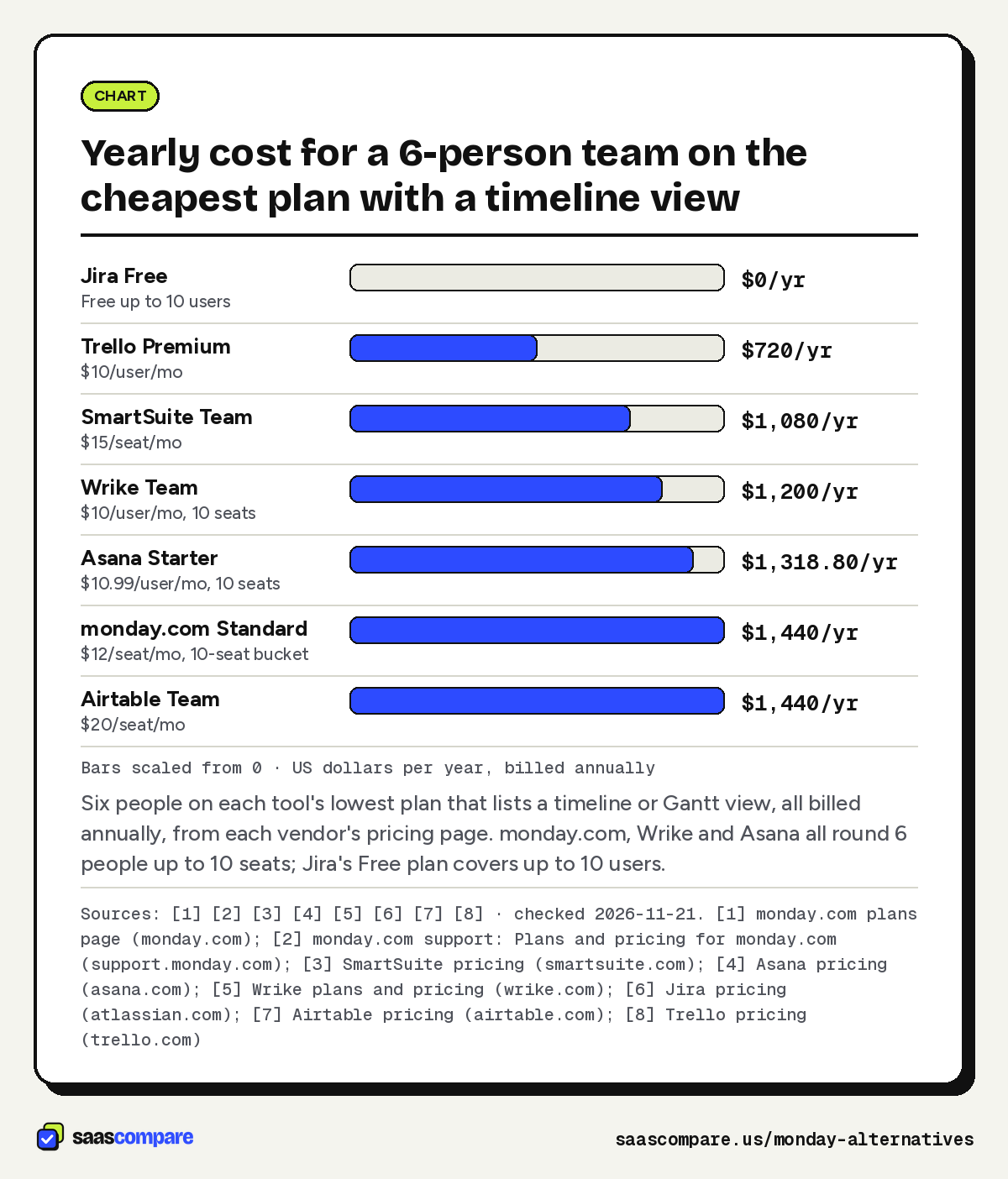
Six people is where bucket pricing bites hardest, so here’s that worked example. Each line is the cheapest plan with a timeline or Gantt view, billed annually:
- Jira Free: $0, because the Free plan covers up to 10 users6
- Trello Premium: 6 × $10 × 12 = $720 a year8
- SmartSuite Team: 6 × $15 × 12 = $1,080 a year3
- Wrike Team: 10 seats (groups of five) × $10 × 12 = $1,200 a year5
- Asana Starter: 10 seats (increments of 5 above 5 users) × $10.99 × 12 = $1,318.80 a year4
- monday.com Standard: the 10-seat bucket at $120 a month, or $1,440 a year12
- Airtable Team: 6 × $20 × 12 = $1,440 a year7
On monday.com, that’s $240 a year for each of the six people actually working, because four seats sit empty12. Bucket pricing isn’t unique to monday.com: Wrike and Asana also round a team of 6 up to 10 seats54. At 10 people every bucket fits exactly, and the gap to per-seat tools narrows.
Bars scaled from 0 · US dollars per year, billed annually
Six people on each tool’s lowest plan that lists a timeline or Gantt view, all billed annually, from each vendor’s pricing page. monday.com, Wrike and Asana all round 6 people up to 10 seats; Jira’s Free plan covers up to 10 users.
Sources: [1] [2] [3] [4] [5] [6] [7] [8] · checked 2026-11-21Download image
How to choose
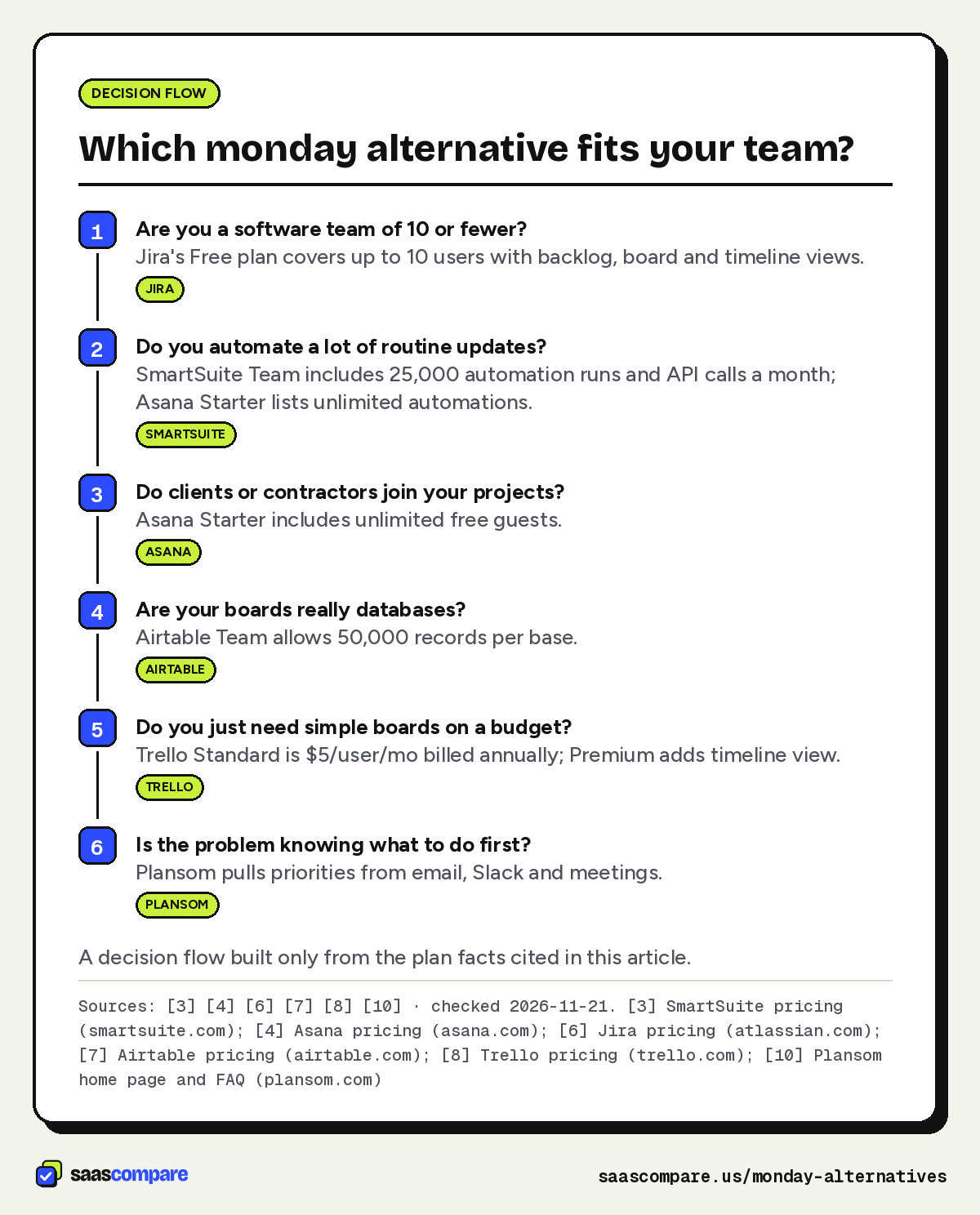
Match the tool to the work your boards hold today.
- Software team of 10 or fewer: Jira Free covers you, with backlog, board and timeline views6.
- Heavy automation: SmartSuite Team includes 25,000 runs a month3, and Asana Starter lists unlimited automations4.
- Clients and contractors in your projects: Asana Starter includes unlimited free guests4.
- Boards that are really databases: Airtable Team allows 50,000 records per base7.
- Simple boards on a budget: Trello Standard at $5 per user, billed annually; step up to Premium for timeline view8.
- Priorities lost in email and Slack: Plansom adds an AI priority layer on top of your tools10.
- Are you a software team of 10 or fewer?Jira's Free plan covers up to 10 users with backlog, board and timeline views.Jira
- Do you automate a lot of routine updates?SmartSuite Team includes 25,000 automation runs and API calls a month; Asana Starter lists unlimited automations.SmartSuite
- Do clients or contractors join your projects?Asana Starter includes unlimited free guests.Asana
- Are your boards really databases?Airtable Team allows 50,000 records per base.Airtable
- Do you just need simple boards on a budget?Trello Standard is $5/user/mo billed annually; Premium adds timeline view.Trello
- Is the problem knowing what to do first?Plansom pulls priorities from email, Slack and meetings.Plansom
A decision flow built only from the plan facts cited in this article.
Sources: [3] [4] [6] [7] [8] [10] · checked 2026-11-21Download image
When to stay on monday.com
Leaving isn’t always the right fix. Stay on monday.com if these fit your team:
- Your headcount lands on a bucket. At 3, 5 or 10 people, every seat you buy gets used2. If you’re at 6, check whether you’ll grow into the 10-seat bucket this year before you migrate.
- Most of your users only read. Basic and higher plans include unlimited free viewers1, so stakeholders who just check status don’t need seats.
- You’ve hit automation limits on Standard. Pro includes 25,000 automation actions and 25,000 integration actions a month, plus private boards and time tracking1. Moving up a plan is often less work than moving tools.
- You need portfolio and resource management. Enterprise lists both, with 250,000 automation actions a month1.
- You pay monthly today. Switching to yearly billing saves 18%2, which may close the gap that sent you looking.
If the seat math still doesn’t work after that, SmartSuite is the closest move for a general business team, with Asana close behind if unlimited automations matter more than seat groups. For a spreadsheet-first view of the same market, see our Smartsheet alternatives guide.
Plans
Plans and prices
SmartSuite
Team
$15/seat/mo
Billed annually ($20 billed monthly), minimum 3 users · checked 2026-11-21
- 5,000 records per solution
- 25,000 automation runs and API calls a month
- Gantt and timeline views
Professional
$32/seat/mo
Billed annually ($36 billed monthly), minimum 5 users · checked 2026-11-21
- 100,000 records per solution
- 100,000 automation runs and API calls a month
- Advanced permissions
Asana
Starter
$10.99/user/mo
Billed annually ($13.49 billed monthly) · checked 2026-11-21
- Timeline and Gantt views
- Unlimited automations
- Unlimited free guests
Advanced
$24.99/user/mo
Billed annually ($30.49 billed monthly) · checked 2026-11-21
- Unlimited portfolios
- Goals
- Resource management
Wrike
Team
$10/user/mo
Billed annually, 2 to 15 users · checked 2026-11-21
- Interactive Gantt charts
- Shareable dashboard
- AI Essentials
Business
$25/user/mo
Annual only, 5 to 200 users · checked 2026-11-21
- Templated workspaces
- Standard integration
- AI Elite starter pack
Jira
Free
$0
Up to 10 users · checked 2026-11-21
- Backlog
- board and timeline views
- 150 automation steps a month
- 2 GB of storage
Standard
$9.70/user/mo
Billed monthly, shown for a 10-user team · checked 2026-11-21
- 400 automation steps per user a month
- 250 GB of storage
- User roles and permissions
Premium
$19.60/user/mo
Billed monthly, shown for a 10-user team · checked 2026-11-21
- Cross-project dependency management
- 750 automation steps per user a month
- Unlimited storage
Trello
Standard
$5/user/mo
Billed annually ($6 billed monthly) · checked 2026-11-21
- 1,000 workspace command runs a month
- Single-board guests
- 250 MB per file
Premium
$10/user/mo
Billed annually ($12.50 billed monthly) · checked 2026-11-21
- Timeline
- calendar and table views
- Unlimited workspace command runs
Airtable
Team
$20/seat/mo
Billed annually · checked 2026-11-21
- 50,000 records per base
- 25,000 automation runs
- Gantt and timeline view
Business
$45/seat/mo
Billed annually · checked 2026-11-21
- 125,000 records per base
- Admin panel
- SAML-based single sign-on
Plansom
Free
$0
Free forever · checked 2026-11-21
- 5 goals
- 100 tasks
- 1 AI plan a month
Pro
$28/user/mo
Billed monthly ($280/user/yr billed annually) · checked 2026-11-21
- Unlimited AI Execute
- Unlimited AI Reporting
- 14-day free trial
Strengths and limits
Strengths and limits
SmartSuite
Visit SmartSuite (opens in a new tab)Strengths
- Per-seat billing with a 3-user minimum and no seat groups listed
- 25,000 automation runs a month on the entry plan
- Gantt chart and timeline view on every plan
Limits
- No free plan, only a 14-day trial
- Team plan caps each solution at 5,000 records
Strengths
- Unlimited automations from the Starter plan
- Unlimited free guests on Starter
- Seats added one at a time up to 5 users
Limits
- Above 5 users, seats are added in increments of 5
- Portfolios and goals need the Advanced plan
Strengths
- Interactive Gantt charts on the Team plan
- Viewers can be added free as limited users
Limits
- Also sold in groups of seats (fives up to 30)
- Team plan stops at 15 users
Strengths
- Free plan for up to 10 users with a timeline view
- Backlog and board views built for sprint work
Limits
- Per-user price depends on team size, so check the calculator
- Cross-project dependencies need Premium
Strengths
- Lowest per-user price among the paid plans here
- Free plan for up to 10 collaborators per workspace
Limits
- Timeline and calendar views need Premium
- Free plan allows 10 boards per workspace
Airtable
Visit Airtable (opens in a new tab)Strengths
- You pay only for people who can edit
- 50,000 records per base on Team
Limits
- Highest entry price in this list
- Free plan caps each base at 1,000 records
Strengths
- Finds tasks in connected email, Slack and meeting tools
- Free plan with no time limit
Limits
- A prioritization layer, not a board or Gantt tool
- Pro costs more per user than the other paid picks here
FAQ
Questions people ask
Why do teams look for a monday alternative?
What is the cheapest monday alternative?
How does monday compare with Wrike?
Both put Gantt charts on their low-cost team plans: monday.com Standard at $12 per seat per month billed annually1 and Wrike Team at $10 per user per month billed annually for 2 to 15 users5. Both sell seats in groups: monday.com in multiples of 5 after a 3-seat minimum2, Wrike in groups of five up to 30 seats5.
How does monday compare with Jira?
Sources
Sources
Small numbers in the text, like 1, point here. Each source shows the date we last checked it.
- 1monday.com plans pagemonday.com
- 2monday.com support: Plans and pricing for monday.comsupport.monday.com
- 3SmartSuite pricingsmartsuite.com
- 4Asana pricingasana.com
- 5Wrike plans and pricingwrike.com
- 6Jira pricingatlassian.com
- 7Airtable pricingairtable.com
- 8Trello pricingtrello.com
- 9Plansom pricingplansom.com
- 10Plansom home page and FAQplansom.com
Updated . See something out of date? Tell us and we will check it against the vendor's page.