
Best ofTeam chat & intranets
Employee Communication Apps for Deskless Teams: What Works Without a Laptop
Employee communication apps for deskless and frontline teams: Connecteam, Blink, Troop Messenger, Zenzap and more, with real prices for a 50-person crew.
Disclosure: we may earn a commission if you buy through links on this page. It costs you nothing extra and never decides a quick answer or an Our pick tag. How we make money.

Quick answer
Pick Connecteam if most of your team never sits at a desk: its free plan covers up to 10 users, and the Communications hub starts at $29 a month for the first 30 users, billed yearly1. Pick Blink for a branded frontline app priced per user from $3.75/user/mo billed annually3, or Troop Messenger for secure chat and calls at $2.50/user/mo4.
At a glance
At a glance
| # | Tool | Best for | Starting price | Link |
|---|---|---|---|---|
| 01 | Connecteam | Deskless crews that also need scheduling and a time clock in the same app | $0 for up to 10 users; $29/mo for the first 30 users, billed yearlychecked 2026-11-21 | Visit (opens in a new tab) |
| 02 | Blink | Frontline teams that want a branded app with a feed, chat and knowledge hub | $3.75/user/mo billed annuallychecked 2026-11-21 | Visit (opens in a new tab) |
| 03 | Troop Messenger | Field teams that need secure chat, calls and live location at a low per-user price | $2.50/user/mochecked 2026-11-21 | Visit (opens in a new tab) |
| 04 | Zenzap | Crews coordinating in WhatsApp groups who want a free team chat with unlimited users | $0 for unlimited users; Business+ from $50/mo for up to 5 users, billed annuallychecked 2026-11-21 | Visit (opens in a new tab) |
| 05 | Staffbase | Larger organizations with a comms team that need a branded app, alerts and SMS | Quote onlychecked 2026-11-21 | Visit (opens in a new tab) |
| 06 | Workvivo | Culture-heavy companies that want a social feed, livestreams and screens at each site | Quote onlychecked 2026-11-21 | Visit (opens in a new tab) |
| 07 | Microsoft Teams | Mixed teams already paying for Microsoft 365 | $4/user/mo paid yearly (Teams Essentials)checked 2026-11-21 | Visit (opens in a new tab) |
| 08 | Slack | Office-led teams that want a few field staff in the same channels | $0; Pro $7.25/user/mo billed annuallychecked 2026-11-21 | Visit (opens in a new tab) |
Prices are the lowest paid starting price on each vendor's public pricing page on the date shown, in US dollars, before tax. Confirm on the vendor's site before you buy.
An employee communication app is how a shift lead in a warehouse, a nurse on a ward or a cleaner between sites hears about schedule changes, policy updates and safety alerts. For deskless teams it has to work on a personal phone, reach people who never check email, and cost little enough that you can give every hourly worker a seat. Pick Connecteam if most of your team never sits at a desk; it is the only tool here that pairs chat and a company feed with a free plan for up to 10 users and a flat price for the first 301.
This list is for small and mid-size teams of 5 to 200 people with mostly frontline staff. If your team works at desks and needs channels, a wiki or an intranet, read our guide to internal communication software instead. Every price below comes from the vendor’s own page, checked on 2026-11-21. We haven’t run these apps ourselves; see how we compare for our method.
What an employee communication app has to do for deskless teams
Desk-based chat tools assume everyone has a laptop and a company login. Frontline teams need something different:
- A feed, not just chat. Managers post one update and see who read it. Connecteam pairs a company feed with read tracking2; Blink, Staffbase and Workvivo are built around a feed too378.
- A price that works for hourly staff. Per-user pricing at $7 or more a month gets expensive at 100 people. Flat or low per-user pricing matters more here than in an office.
- Reach beyond the app. SMS fallback, push alerts and translation help messages land with people who rarely open the app27.
- Shift context. Many deskless teams also need scheduling or a time clock. Fewer apps means fewer logins for staff who are already on their feet.
Connecteam: chat, updates and scheduling in one app
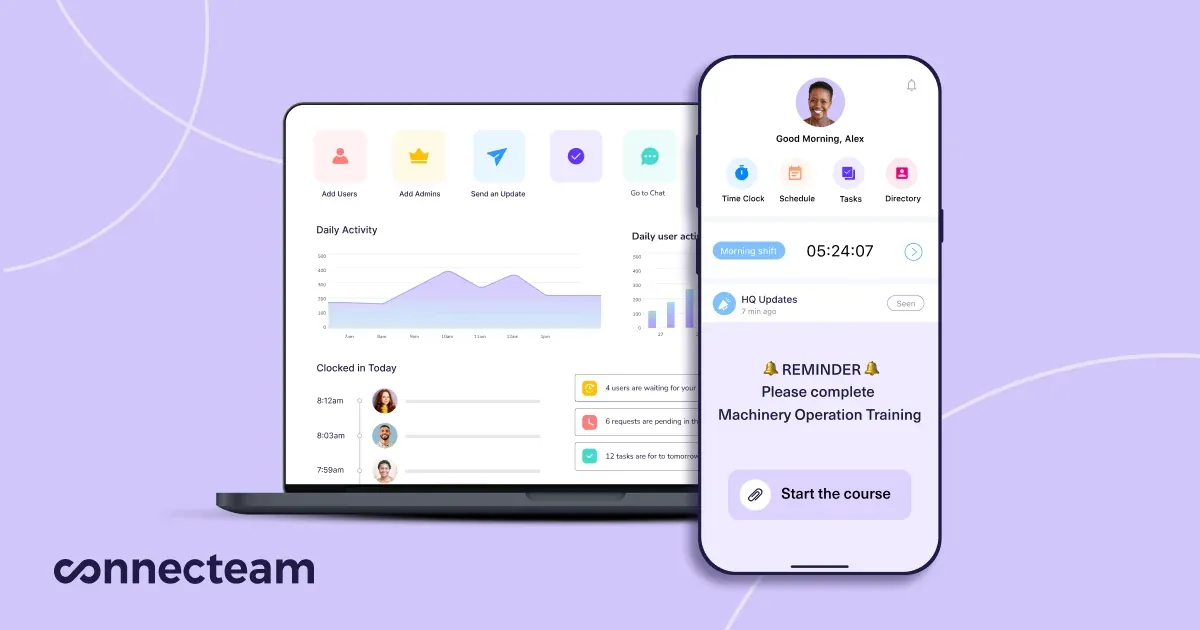
Pick Connecteam if most of your people work on site and you also schedule shifts or track hours. Its Communications hub covers chat, a company feed, a directory, surveys, events, a knowledge base and a help desk2, and the same app has a time clock and employee scheduling2.
Pricing is unusual: each paid tier is a flat monthly fee for the first 30 users, then a small charge per extra user1.
- Small Business: free for life for up to 10 users, with all hubs and features1.
- Basic: $29/mo billed yearly or $35 monthly for 30 users, then $0.50 per extra user a month on yearly billing1.
- Advanced: $49/mo billed yearly or $59 monthly, then $1.50 per extra user1.
- Expert: $99/mo billed yearly or $119 monthly, then $3 per extra user1.
Worked example: 50 users on Basic, billed yearly, cost $29 + (20 × $0.50) = $39 a month. On Advanced it is $49 + (20 × $1.50) = $79 a month1.
Updates can go to the feed or out by SMS, and you can see who read an important post2. Chat includes AI translation for multilingual teams2. Pop-up updates with read confirmation, scheduled feed updates and auto-translated updates sit on the Expert tier, and SSO and two-factor authentication are Enterprise features1.
Blink: a branded frontline app priced per user
Pick Blink if you want an app that feels like your own company’s, with a feed, chat and a knowledge hub, and you’d rather pay a plain per-user price. Core is $3.75/user/mo billed annually or $4.50 monthly; Pro is $5/user/mo billed annually or $6 monthly; Enterprise is quoted3.
Core includes in-app branding, the internal comms platform, a real-time collaboration suite and a knowledge hub3. Pro adds multi-language publishing with real-time translation, events and live streaming, user provisioning and an AI assistant3. Blink’s feature comparison also lists offline messaging and shift management and scheduling3. Voice and video calling is sold as an add-on3.
Worked example: 50 users on Core, billed annually, cost 50 × $3.75 = $187.50 a month3. Blink offers a free trial rather than a free plan3.
Troop Messenger: secure chat and calls at the lowest seat price
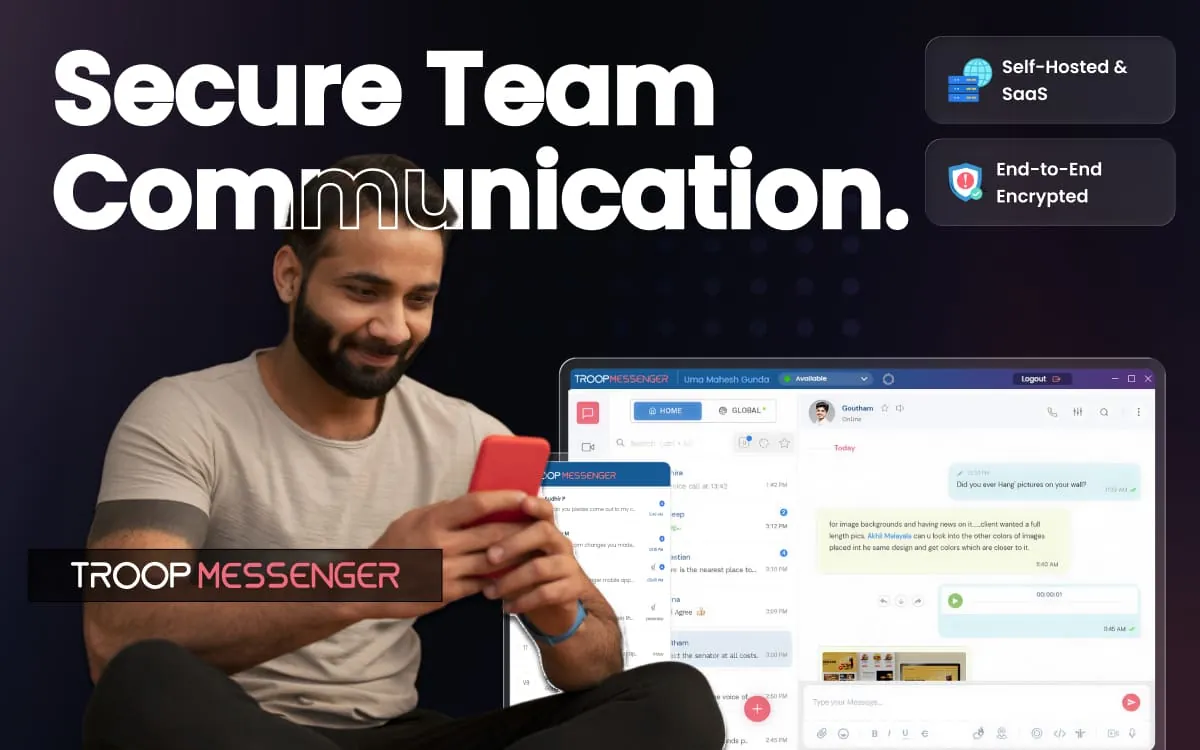
Pick Troop Messenger if your field teams mainly need secure messaging and calls, and price per seat matters most. Premium is $2.50/user/mo and Enterprise is $5/user/mo; a Superior tier at $9/user/mo is marked coming soon for 500+ users4. Troop says monthly and annual billing carry the same per-user rate in USD, so there is no discount for paying a year up front4.
Premium includes one-to-one and unlimited group chats, audio and video calls, audio messages, message recall, live location tracking and 150 GB of storage4. Enterprise adds group calls, screen sharing, read receipts and 1 TB of storage4. Apps cover Windows, macOS, Linux, Android, iOS and web browsers, and you can move to self-hosting later4.
Worked example: 50 users on Premium cost 50 × $2.50 = $125 a month4. There is a 7-day free Enterprise trial, not a free plan4. Troop’s pricing page shows no company feed or knowledge base, so treat it as a chat tool. A full frontline hub would also need a feed and a knowledge base.
Zenzap: free team chat for crews leaving WhatsApp

Pick Zenzap if your crews coordinate in personal WhatsApp groups today and you want a free work chat with no user cap. The Free plan is $0 for unlimited users and includes group chats and DMs, built-in to-dos, scheduled messages, WhatsApp chat migration and 1 GB of storage5.
Paid plans are priced by team size, not per seat5:
- Lite (no AI): $112/mo for up to 50 users billed annually, or $140 monthly; $51/mo for up to 20 users5.
- Business+: $415/mo for up to 50 users billed annually, or $519 monthly; $50/mo for up to 5 users5.
Zenzap now describes itself as a team chat with AI agents that take action6, and Business+ is built around those agents, voice and video calls and 10 TB of storage5. That makes it a strong group-chat replacement, but it doesn’t list frontline broadcast features like SMS updates or read confirmations on its pricing page.
Staffbase: quote-based app for larger frontline workforces
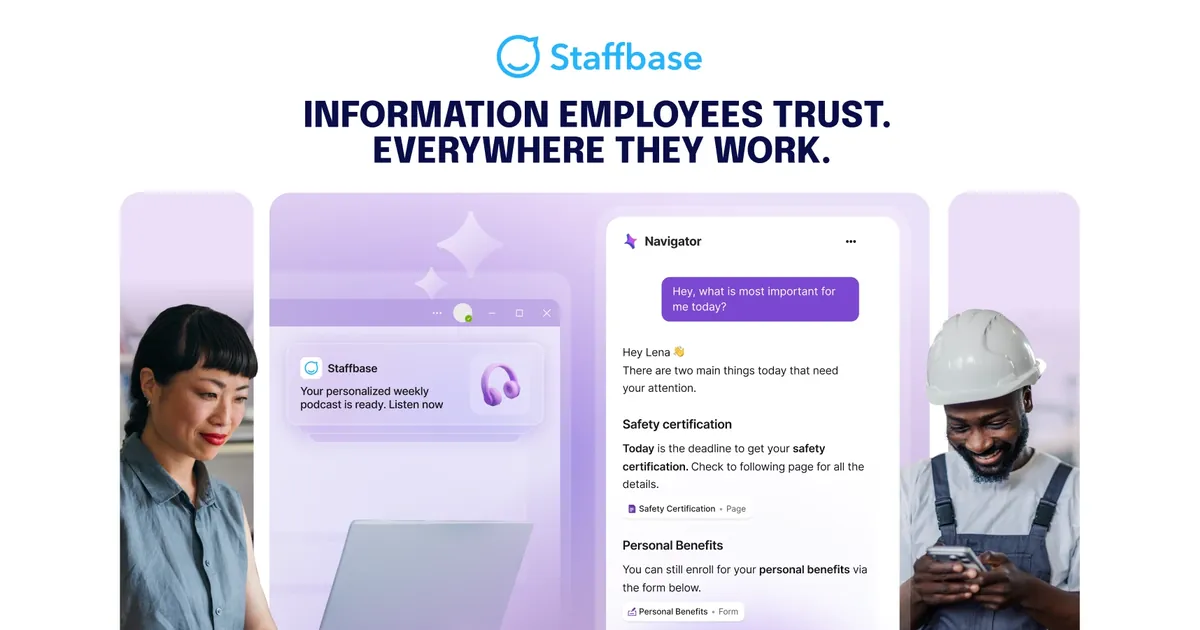
Pick Staffbase if you have a dedicated comms person and need a branded app with push notifications and urgent alerts. Its frontline plan lists a branded superapp, an AI employee assistant, self-service support, multi-language content and task management, with SMS communications and digital signage as optional extras7.
Staffbase doesn’t publish prices. Licenses are based on the number of users who can access the platform, billed annually, and admins and editors don’t count extra7. Its own example of a customer is a 500-person retailer7, which tells you where it usually sits. For a 40-person team it is probably more platform than you need.
Beekeeper, another frontline name you’ll see on shortlists, now points its pricing page to LumApps, which says Beekeeper is part of LumApps and offers demos rather than a price list9.
Workvivo: social feed and screens for multi-site teams

Pick Workvivo if culture and recognition are the point: shoutouts, livestreams, podcasts and surveys. Its core HQ product lists push notifications, auto-translate, livestreams, a people directory, surveys and polls8. Chat is a separate add-on, powered by Zoom’s Video SDK, and Workvivo TV puts updates on screens at offices and frontline locations8. Pricing is a custom quote8.
Microsoft Teams: the baseline if you already pay for Microsoft 365
Pick Teams if your office already runs on Microsoft 365 and only a few frontline roles need access. Teams Essentials is $4/user/mo paid yearly with 10 GB of storage per user; Microsoft 365 Business Basic is $7/user/mo paid yearly, runs on web and mobile apps, and includes Bookings and Shifts for scheduling10. Both are sold for 1 to 300 users10.
Worked example: 50 users on Teams Essentials cost $200 a month, paid yearly10. That is five times Connecteam Basic for the same headcount1.
Slack: the baseline for office-led teams
Pick Slack if your company lives in channels and you want a handful of field staff in them. The free plan keeps 90 days of message history; Pro is $7.25/user/mo billed annually or $8.75 monthly, and Business+ is $15/user/mo billed annually11. Slack’s pricing page lists a frontline teams add-on11. Worked example: 50 users on Pro cost $362.50 a month, billed annually11.
Prices for a 50-person crew
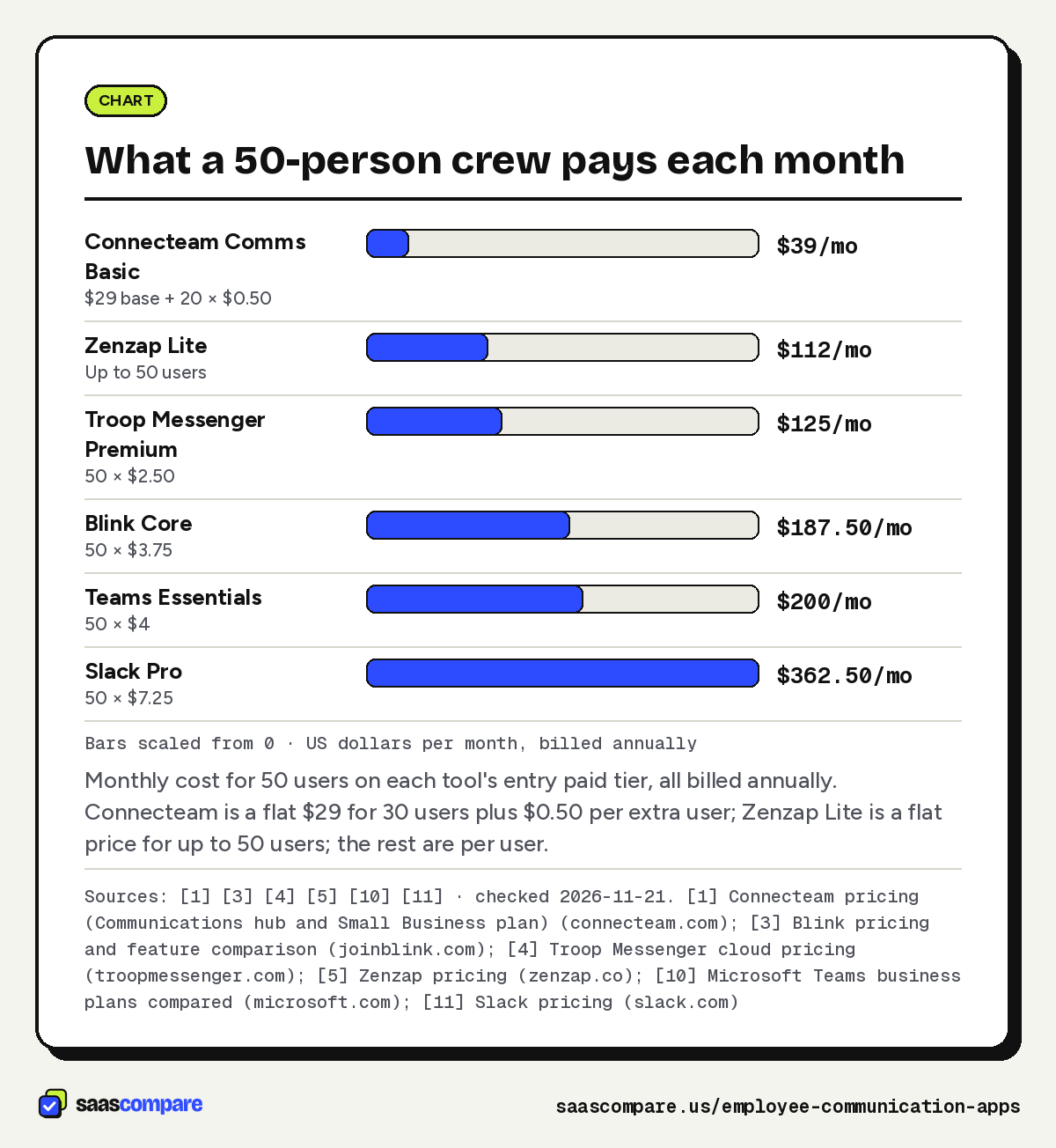
Here is what each tool’s entry paid tier costs for 50 users, all on annual billing:
| Tool and plan | Pricing model | 50 users, per month |
|---|---|---|
| Connecteam Communications Basic | $29 flat for 30 users + $0.50 per extra user | $391 |
| Zenzap Lite | Flat, up to 50 users | $1125 |
| Troop Messenger Premium | $2.50 per user | $1254 |
| Blink Core | $3.75 per user | $187.503 |
| Microsoft Teams Essentials | $4 per user | $20010 |
| Slack Pro | $7.25 per user | $362.5011 |
Zenzap Free and Connecteam’s free plan can cost $0, with limits: Zenzap Free has 1 GB of storage5, and Connecteam’s free plan stops at 10 users1. Staffbase and Workvivo are quote-only78.
Bars scaled from 0 · US dollars per month, billed annually
Monthly cost for 50 users on each tool’s entry paid tier, all billed annually. Connecteam is a flat $29 for 30 users plus $0.50 per extra user; Zenzap Lite is a flat price for up to 50 users; the rest are per user.
Sources: [1] [3] [4] [5] [10] [11] · checked 2026-11-21Download image
How to choose
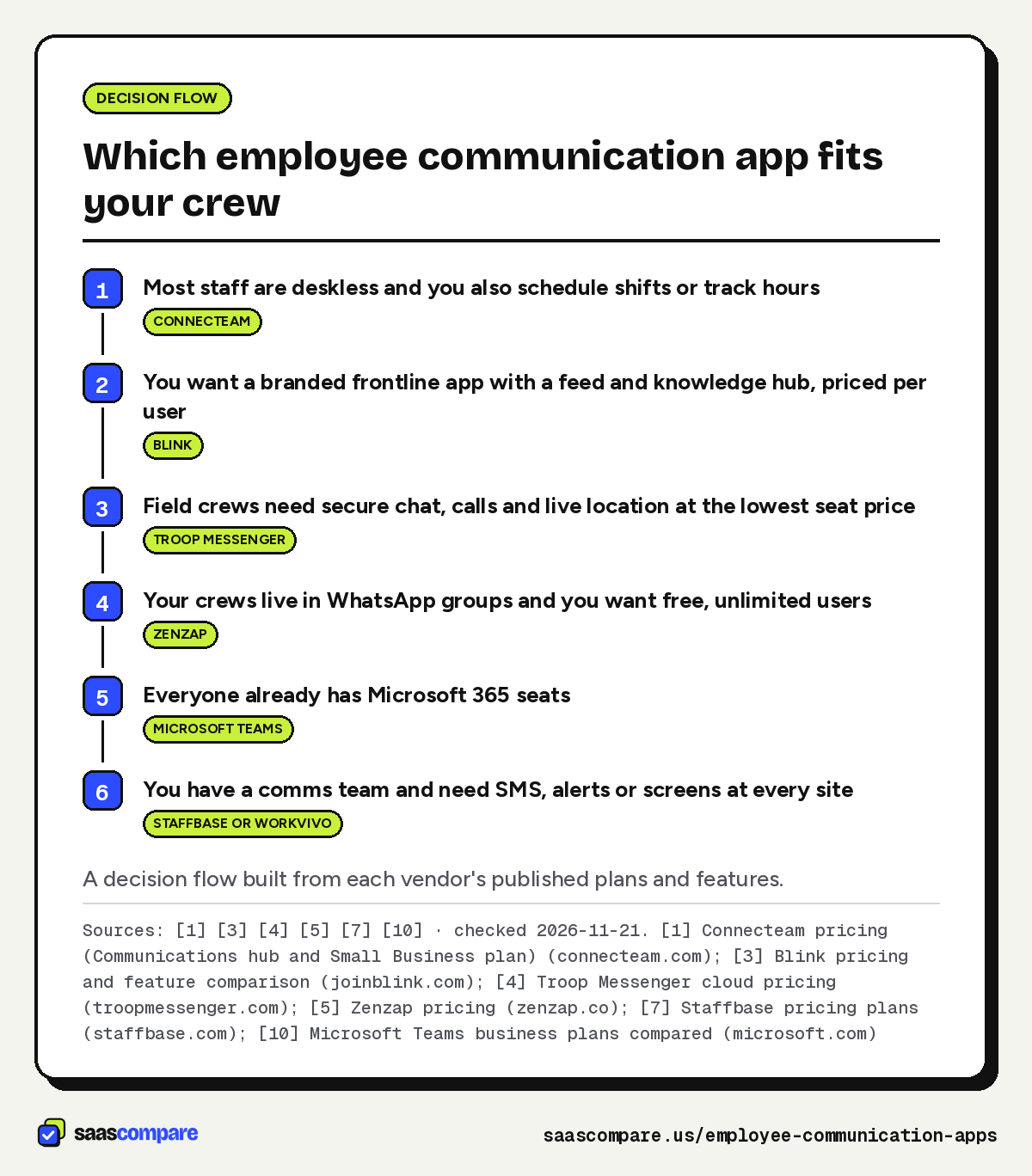
Start with who you need to reach and how:
- Mostly deskless, and you also schedule or track time: Connecteam. One app for updates, chat and shifts, at a flat price up to 30 users12.
- You want a polished, branded app with a knowledge hub: Blink, at a simple per-user price3.
- Chat and calls are enough, and seat price rules: Troop Messenger at $2.50/user/mo4.
- You’re moving crews off WhatsApp on a zero budget: Zenzap Free5.
- You’re already on Microsoft 365: add Teams before buying anything new10.
- You have hundreds of staff and a comms team: get quotes from Staffbase and Workvivo78.
If shift scheduling is the bigger problem than messaging, our When I Work alternatives guide compares scheduling tools, several of which include team chat. And read our editorial policy to see how we keep commissions out of the rankings.
- Most staff are deskless and you also schedule shifts or track hoursConnecteam
- You want a branded frontline app with a feed and knowledge hub, priced per userBlink
- Field crews need secure chat, calls and live location at the lowest seat priceTroop Messenger
- Your crews live in WhatsApp groups and you want free, unlimited usersZenzap
- Everyone already has Microsoft 365 seatsMicrosoft Teams
- You have a comms team and need SMS, alerts or screens at every siteStaffbase or Workvivo
A decision flow built from each vendor’s published plans and features.
Sources: [1] [3] [4] [5] [7] [10] · checked 2026-11-21Download image
Plans
Plans and prices
Connecteam
Small Business
$0
Up to 10 users, free for life · checked 2026-11-21
- All hubs and features
Basic
$29/mo
Billed yearly ($35 monthly); first 30 users, then $0.50/user/mo · checked 2026-11-21
- Unlimited chats
- Company feed
- Surveys and events
- Knowledge base (3 categories)
Advanced
$49/mo
Billed yearly ($59 monthly); first 30 users, then $1.50/user/mo · checked 2026-11-21
- Scheduled chat messages
- Live polls
- Anonymous surveys
- Unlimited knowledge base categories
Expert
$99/mo
Billed yearly ($119 monthly); first 30 users, then $3/user/mo · checked 2026-11-21
- Pop-up updates with read confirmation
- Auto-translated updates
- API access
Blink
Core
$3.75/user/mo
Billed annually ($4.50 monthly) · checked 2026-11-21
- Company branding
- Internal comms feed
- Chat
- Knowledge hub
Pro
$5/user/mo
Billed annually ($6 monthly) · checked 2026-11-21
- Multi-language publishing and translation
- Events and live streaming
- User provisioning
- AI assistant
Troop Messenger
Premium
$2.50/user/mo
Same rate monthly or annually ($30/user/yr) · checked 2026-11-21
- Unlimited group chats
- Audio and video calls
- Live location tracking
- 150 GB storage
Enterprise
$5/user/mo
Same rate monthly or annually ($60/user/yr) · checked 2026-11-21
- Group calls
- Screen sharing
- Read receipts
- 1 TB storage
Zenzap
Free
$0
Unlimited users · checked 2026-11-21
- Group chats and DMs
- Built-in to-dos
- WhatsApp chats migration
- 1 GB storage
Lite
$112/mo
Up to 50 users, billed annually ($140 monthly) · checked 2026-11-21
- Voice and video calls
- Task checklists
- 100 GB storage
Business+
$415/mo
Up to 50 users, billed annually ($519 monthly) · checked 2026-11-21
- AI agents and workflows
- Voice and video calls
- 10 TB storage
Strengths and limits
Strengths and limits
Connecteam
Visit Connecteam (opens in a new tab)Strengths
- Flat price for the first 30 users, then cents per extra user
- Updates can go out by SMS as well as the in-app feed
- Time clock and scheduling live in the same app as chat
Limits
- Read confirmations and auto-translated updates sit on the Expert tier
- SSO and two-factor authentication are Enterprise-only
Strengths
- Simple per-user price with no base fee
- Lists offline messaging and shift scheduling in its feature set
Limits
- Voice and video calling is an add-on
- Translation needs the Pro plan
Troop Messenger
Visit Troop Messenger (opens in a new tab)Strengths
- Lowest published per-user price in this list
- Apps for Windows, macOS, Linux, Android, iOS and the web
Limits
- A 7-day trial rather than a free plan
- Chat-first; no company feed or knowledge base on the pricing page
Strengths
- Free plan with no user cap
- Flat team-size pricing instead of per-seat
Limits
- Free storage is only 1 GB
- The product now leads with AI agents, not frontline broadcast tools
Staffbase
Visit Staffbase (opens in a new tab)Strengths
- Dedicated frontline plan with push notifications and urgent alerts
- Admins and editors don't count as extra licenses
Limits
- No published prices
- SMS and digital signage are optional extras
Workvivo
Visit Workvivo (opens in a new tab)Strengths
- Auto-translate, push notifications and livestreams in the core product
- Workvivo TV puts updates on screens at frontline locations
Limits
- No published prices
- Chat is a separate add-on
Microsoft Teams
Visit Microsoft Teams (opens in a new tab)Strengths
- Business Basic includes Shifts and Bookings for scheduling
- Sold for 1 to 300 users
Limits
- Every frontline worker needs a paid seat
- Built around chat and meetings rather than a broadcast feed
Strengths
- Free plan for small teams
- Lists a frontline teams add-on on its pricing page
Limits
- The free plan keeps 90 days of message history
- Highest per-user price of the published options here
FAQ
Questions people ask
Is there a free employee communication app?
What does an employee communication app cost for 50 people?
Can I reach staff who never open the app?
Which apps translate messages for multilingual crews?
Sources
Sources
Small numbers in the text, like 1, point here. Each source shows the date we last checked it.
- 1Connecteam pricing (Communications hub and Small Business plan)connecteam.com
- 2Connecteam Communications hub featuresconnecteam.com
- 3Blink pricing and feature comparisonjoinblink.com
- 4Troop Messenger cloud pricingtroopmessenger.com
- 5Zenzap pricingzenzap.co
- 6Zenzap home pagezenzap.co
- 7Staffbase pricing plansstaffbase.com
- 8Workvivo pricingworkvivo.com
- 9LumApps home page (where beekeeper.io/pricing now redirects)lumapps.com
- 10Microsoft Teams business plans comparedmicrosoft.com
- 11Slack pricingslack.com
Updated . See something out of date? Tell us and we will check it against the vendor's page.